
1. Log into your cPanel account.
2. In the Files section, click on Backup Icon.

3. Under Full Backup, Click on Download a Full Website Backup button.

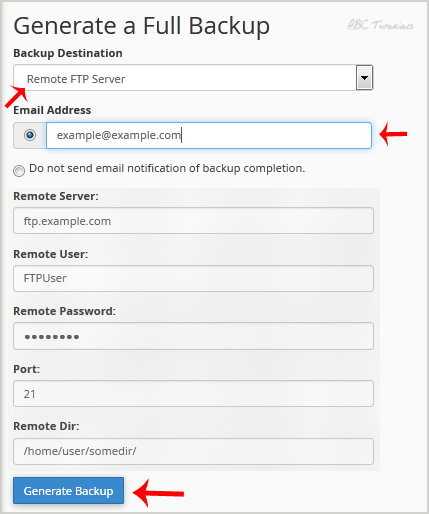
4. From the Dropdown menu, Select the Backup destination to Remote FTP Server. In the Email field, Enter your email address.
Remote Server: FTP IP address or FTP domain name like ftp.example.com,
Remote User: Your FTP Username
Remote Password: Your FTP Password
Port: 21 or other FTP Port
Remote Dir: Remote Directory like /home/username/backupfolder/
5. Once you fill in the Remote FTP details, click on the Generate Backup button.
Leave a Reply