
How to Access or Connect to Your FTP Account via the FileZilla FTP?

Contents

    You can access your FTP Account using the FileZilla FTP Client or any FTP Client.


    1. Open the FileZilla FTP Client.

    2. Enter your FTP Host, Username and Password. You can use your cPanel username and password as your FTP User and Password.
    In the Host field, Enter your domain name such as ftp.example.com or example.com.

    3. Click on Quick Connect, and it will take a few seconds to connect. Then your website will appear on the right side.
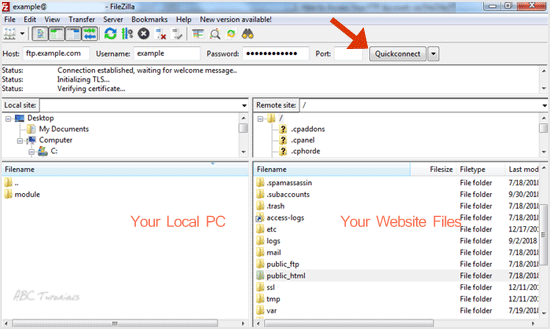
    Now you can start using the FileZilla Client, manage your website files, and upload/delete files from your website.

    Updated on December 20, 2018
    Was this article helpful?

    893 responses to “How to Access or Connect to Your FTP Account via the FileZilla FTP?”

    1. Dariusz Kowalczyk Avatar

      Short, sweet and it worked on the first try. Rare.

    2. Dieter Flack Avatar

      Is there a reason anyone still prefers the old way of connecting? Just curious.

    3. Latrice Hardman Avatar

      Finally a clear path through the login mess. Bookmarking this one.

    4. Jacob Lewis Avatar

      Quick question: is passive mode really needed, or is that just habit?

    5. Kory Dobbs Avatar

      Short, sweet, and no detours. More like this please.

    6. Cherie Schiffman Avatar

      Clean steps. Why does the host field trip up so many of us?

    7. Rory Odom Avatar

      Crisp and to the point. Why do hosts make this so confusing?

    8. Charlie Kohlmeier Avatar

      Exactly the nudge I needed to finally ditch the web uploader.

    9. Marissa Conyers Avatar

      Nice and tidy. How long did the first setup take you?

    10. Johnette Butters Avatar

      Nice one. The folder layout tip alone was worth the read.

    11. Shannon Poulson Avatar

      Quick question: is passive mode always the safer pick?

    12. Declan Muniz Avatar

      Plain and useful. Now I can stop emailing files to myself.

    13. Art Rennie Avatar

      Does this still hold up with the newest client version?

    14. Shela Uy Avatar

      Worked like a charm, even on my ancient laptop.

    15. Iokepa Kealoha Avatar

      Finally, a guide that skips the jargon. Who is it aimed at?

    16. Jenny White Avatar

      Short guide, big payoff. Wish I’d found it sooner.

    17. Sanford Parham Avatar

      Bookmarked. Is there a version for key-based logins too?

    18. Pearl Cheek Avatar

      The screenshots made all the difference for me.

    19. Teodor Halonen Avatar

      Neat walkthrough. Why do some servers insist on a different port?

    20. Dan Schroder Avatar

      Simple, direct, and it actually worked on the first go.

    21. Kristal Streeter Avatar

      Anyone else’s connection drop right at the login step?

    22. Liliana Bateman Avatar

      Saved me a headache before a deadline. Thanks for that.

    23. Claudio Cardona Avatar

      Great for beginners. What made you write it now?

    24. Mamie Marler Avatar

      Clear steps, no fluff. That’s rare for FTP guides.

    25. Sergio Pulley Avatar

      Why would anyone still need this in the age of browsers? Curious.

    26. Tonia Whitman Avatar

      Handy refresher. I always forget where the site manager hides.

    27. Dong Binns Avatar

      Is there a reason the default transfer type trips people up so often?

    28. Shavonne Claypool Avatar

      Plain and practical. Does anyone know why the connection drops after idling?

    29. Bettye Meldrum Avatar

      Took me three tries to get the passive mode setting right, honestly.

    30. Mohammed Medders Avatar

      Short and sweet. Does the port number ever change between hosts?

    31. Damien Logsdon Avatar

      Why isn’t this the first result whenever someone searches for FTP help?

    32. Chadwick Lamington Avatar

      Quick and painless. I expected a headache and got a shrug.

    33. Dane Milliman Avatar

      Is a desktop client really better than the browser way?

    34. Shantell Bar Avatar

      Finally an explanation that skips the jargon. Thanks for that.

    35. Kandice Hopper Avatar

      Why does the first login always fail until the second try?

    36. Mollie McDonnell Avatar

      Bookmarked. My future self will thank me at 2 a.m.

    37. Major Grisham Avatar

      Nothing fancy, just a guide that actually does its job.

    38. Clarice Embry Avatar

      What happens if the server times out halfway through a big upload?

    39. Antonetta Rendall Avatar

      Connecting remotely used to scare me. Not so much now.

    40. Noemi Maynard Avatar

      Clear screenshots would make this even better, honestly.

    41. Allison Gardin Avatar

      Why do hosts hide these credentials so well anyway?

    42. Daisy Deal Avatar

      Worked first go on my laptop. Small win, but I’ll take it.

    43. Doug Retzlaff Avatar

      Do people really still upload by hand these days? Asking for a friend.

    44. Lyndon Niland Avatar

      Simple steps, solid result. Exactly what a beginner needs.

    45. Glenn Harpster Avatar

      Is there a reason the guide skips the secure connection option?

    46. Jerrell Carey Avatar

      Drag, drop, done. Funny how a good guide makes it feel obvious.

    47. Hyman Beard Avatar

      Why is the transfer always slow on the first connect, though?

    48. Marie Garrett Avatar

      Took me three tries the first time. Anyone have a trick for remembering the login details?

    49. Sammy Warrick Avatar

      Short, clear and no fluff. Wish every setup page was like this.

    50. Michael Sinclair Avatar

      Nice and tidy. Who else keeps forgetting which port to use?

    51. Jonna Corbitt Avatar

      Bookmarking this for the next time a server refuses to cooperate.

    52. Lizzie Harbison Avatar

      Is the passive mode setting what trips most people up here?

    53. Grant Lira Avatar

      Handy refresher. Connecting is easy once the host and port finally click.

    54. Domenic Propsting Avatar

      Why does anyone still need a walkthrough for FTP in 2023? Genuinely curious what people are stuck on.

    55. Brian And Dee Dale Avatar

      One of those guides you bookmark and then forget you bookmarked. Good stuff.

    56. Lawanna Pie Avatar

      Finally a guide that does not bury the point. Thanks for this.

    57. Albertha Haas Avatar

      Handy one. Why do so many hosts hide these details?

    58. Andrea Baley Avatar

      Straight to the point. Does this also work behind a strict firewall?

    59. Zack Charlton Avatar

      Saving this. Future me will definitely need it.

    60. Robin Windeyer Avatar

      Why is the default transfer mode so confusing? This cleared it right up.

    61. Phyllis Eberly Avatar

      Short, sweet and it actually worked. What more could I ask?

    62. Maham Hannam Avatar

      Anyone know why it times out on the first attempt? Mine did, then worked.

    63. Zack Higgin Avatar

      Good reminder that the simple way usually works best.

    64. Chantal Glenelg Avatar

      So the host field is the whole secret? Why is this never mentioned up front?

    65. Robin Kelley Avatar

      Clear steps, no detours. That is rarer than it should be.

    66. Christopher Woodhouse Avatar

      Neat. Would a short video version exist, or is that asking too much?

    67. Maham Brunskill Avatar

      Took me two tries, but the passive mode tip finally fixed it.

    68. James Gordon Avatar

      Why does the first connection always feel like magic? Good write-up.

    69. Virgilio Lammon Avatar

      The second screenshot did all the work for me. Thanks!

    70. Aja Keener Avatar

      Love a guide that skips the fluff. Anyone else keep this tab open all week?

    71. Margarette Lozano Avatar

      Saved me a ten minute hunt through old settings. Cheers.

    72. Jordan Peterson Avatar

      Is there any reason to still do this by browser upload? Genuinely curious.

    73. Gregory Bush Avatar

      Short and painless, just how a setup guide should be.

    74. Robyn Kessell Avatar

      Funny how a tiny client saves so much hassle. Why did I wait so long?

    75. Chase Richards Avatar

      Bookmarking this for the day I forget my own password again.

    76. Indira Nave Avatar

      Nice and simple. Does anyone actually read the status log while it connects?

    77. Ravi Jasso Avatar

      Ten seconds of clicking and I am in. Then I spend an hour wondering where the files went.

    78. Basil Noel Avatar

      Quick question: is the port number the part everyone trips on, or just me?

    79. Chase Richards Avatar

      Honestly, who still needs a walkthrough for this? Turns out me, every single time.

    80. John Wellson Avatar

      Thanks, this one is a keeper for my bookmarks.

    81. Ravi Shakespeare Avatar

      Was there a trick to the quickconnect bar, or is it just luck?

    82. David Quillson Avatar

      Great refresher. I always forget the order of the fields.

    83. Chong Gilbreath Avatar

      Why is the transfer type setting buried so deep?

    84. Chase Peterson Avatar

      Simple enough that even my cat could follow it.

    85. Steve Talker Avatar

      I came for the settings, stayed for the clear wording.

    86. Ravi Ennor Avatar

      Neat little tutorial. The screenshots would be the cherry on top.

    87. Albert Neistat Avatar

      Does this still apply if the server uses a different encryption setup?

    88. Ravi Irving Avatar

      Three clicks and I was in. Sweet.

    89. Peter Dawnson Avatar

      Why do they make the host field so easy to mistype?

    90. Samuel Gibson Avatar

      Saved me a support ticket, honestly.

    91. Ravi Logan Avatar

      Clear steps, zero fluff. That is rare.

    92. Ravi Buckley Avatar

      Is there a reason everyone skips the passive mode setting?

    93. Susan Stromberg Avatar

      Handy. My only wish is a note on what to do when it times out.

    94. Willson Pecker Avatar

      Finally, a walkthrough that does not assume I am a sysadmin.

    95. Evie Moya Avatar

      Could use a screenshot of the login box, but still helpful.

    96. Gabriel Soucie Avatar

      Worked first try, which never happens to me.

    97. Jordan Ronalds Avatar

      Quick question: why does the port number matter so much?

    98. Ravi Fox Avatar

      I like that it skips the jargon. Thanks for that.

    99. Chasity Stawell Avatar

      Nice and tidy. Does this work on older laptops too?

    100. Rosemary Salo Avatar

      Step three is where I always second-guess myself.

    101. Sadye Kroeger Avatar

      Was the old method really that painful, or is this just nicer?

    102. William Galindo Avatar

      Bookmarking this before my next server mix-up.

    103. Rocco Inwood Avatar

      Short, clear, and it finally made the connection screen make sense.

    104. Ravi Burgin Avatar

      Why would anyone still need this guide in 2026? Genuinely curious.

    105. Hildred McConnel Avatar

      Clean instructions and no detours. That alone deserves a thank you.

    106. Smith Dawnson Avatar

      Took me three tries, but the last step in your list was the missing piece.

    107. Reyes Gambrel Avatar

      Plain English for once. My team keeps sending me this kind of fix by chat, so I am sharing this.

    108. Bea Hopwood Avatar

      Does anyone else forget the password right at the last step? Good steps here.

    109. Ravi Timms Avatar

      Neat. Would love a follow-up on resuming interrupted transfers.

    110. Zella Lempriere Avatar

      The part about saving the site profile is gold. Thanks for spelling it out.

    111. Stephanie Coupp Avatar

      Wish I had found this before spending a whole evening guessing at passwords.

    112. Teri Mullan Avatar

      Why is the quickconnect bar so tempting if it fails half the time? Anyway, nice guide.

    113. Kazuko Milburn Avatar

      Tried this on a borrowed machine and it behaved. Small win for the day.

    114. Aitalina Chuprin Avatar

      I like that it explains the why and not only the clicks. Made the whole thing less scary.

    115. Kelly Aguilera Avatar

      Straight to the point, no fluff. That is how a how-to should read.

    116. Bonita Lemus Avatar

      This cleared up the error I kept seeing about the connection timing out.

    117. Esteban Rudnick Avatar

      Is the port number really always 21, or did I just get lucky? Useful read.

    118. Tomas Deloach Avatar

      Clear enough that I did it half asleep. Thanks for writing it up.

    119. Eusebia Rausch Avatar

      Funny how a ten-minute fix always takes an hour until you find a guide like this.

    120. Wilburn Benge Avatar

      Bookmarked. Simple enough that even my dad could follow along.

    121. Dominique Shapcott Avatar

      Quick question: does this also apply when the server only allows secure connections?

    122. Justine Quillen Avatar

      My old laptop still has these settings saved from years ago, so this was a fun refresher.

    123. Cecilia Joyce Avatar

      Nice and tidy. The screenshots of the site manager would have made it perfect.

    124. Ravi Linder Avatar

      Why does every FTP tutorial skip the passive mode part? Glad this one mentions it.

    125. John Wood Avatar

      Worked on the first try, which is rare for me with anything involving servers.

    126. Milagros Malm Avatar

      Short and clear. I wish the host had put this in the welcome email.

    127. Hollis Chirnside Avatar

      Is there a reason the default transfer mode never seems to be right? Good guide anyway.

    128. Michael Walls Avatar

      Finally a step-by-step that skips the jargon. Saved this for the next time I forget my port.

    129. Jorg Rauch Avatar

      Handy walkthrough, though I never understood why FileZilla needs so many settings just to log in.

    130. Clean steps, zero drama. That’s how a tutorial should read.

    131. Ralph Rodriguez Avatar

      Quick question: does the same trick work for a shared plan?

    132. Gonzalo Valentino Avatar

      Neat walkthrough, and the tone is refreshingly relaxed.

    133. Donnell McQuade Avatar

      Wish I’d found this before I spent a weekend guessing.

    134. Ralph Wills Avatar

      Good call explaining the transfer queue, I always ignored it.

    135. Michael Yoshioka Avatar

      Simple enough that even my first attempt went through.

    136. Phil Mertz Avatar

      Took me two tries, but the guide held up both times.

    137. Robert Sims Avatar

      Handy refresher, especially the part about saving site entries.

    138. Kate Follmer Avatar

      Why is the quickconnect bar so tempting yet so unreliable? Great tips here.

    139. Robin Bible Avatar

      Bookmarked for the next time I forget my settings.

    140. Elijah Roland Avatar

      Used this to move my old site files over. Smooth ride.

    141. David Rowe Avatar

      Clear screenshots would make this perfect, but the steps are solid.

    142. Lourdes Bowker Avatar

      Does this also work if the server uses a nonstandard port?

    143. Robin Perkin Avatar

      Nice and tidy. I’d have wasted an hour without this.

    144. Trent Laporte Avatar

      Anyone else mix up SFTP and FTP at first? This sorted it for me.

    145. Lokiru Ekai Avatar

      Small detail, big difference. The host field tripped me up for ages.

    146. Dixie Swanston Avatar

      Tried this on a spare laptop first, worked on the first go.

    147. Jeannie French Avatar

      Finally an FTP guide that doesn’t assume I already know everything.

    148. Toby Nicklin Avatar

      Wonder why hosts don’t just ship this explanation in the welcome email.

    149. Antje Aston Avatar

      My server kept rejecting the login until I read this. Thanks for the pointer.

    150. Ingrid McEacharn Avatar

      Short, clear, and no fluff. More guides like this please.

    151. Brigette Neace Avatar

      Step three was the part I kept getting wrong. Good to see it spelled out.

    152. James Durham Avatar

      Is there a reason the passive mode setting trips everyone up?

    153. Ramdhani Chaubey Avatar

      Never thought FTP could be this painless. Bookmarking this one.

    154. Natalie Campbell Avatar

      Does anyone actually read the warning popup? I never did.

    155. Julian Roe Avatar

      Good reminder that the basics still matter.

    156. Tommie Hawkins Avatar

      Handy refresher. I keep forgetting the host field format.

    157. James Flint Avatar

      Why does FileZilla still feel confusing for first timers? This cleared it up nicely.

    158. Chester Leverette Leverette Avatar

      Honestly I always forget the port settings, so this walkthrough saved me a headache.

    159. Amy Oviedo Avatar

      Nice one. What would you change if the host blocked the default port?

    160. Rodney Boone Avatar

      Simple enough that even my cousin could follow it.

    161. Doyle Brannon Avatar

      Why does the server always reject me on the first try?

    162. Amelia Brown Avatar

      Ten minutes of reading beats an hour of guessing.

    163. Cameron Profitt Avatar

      Neat little guide. Would love one for the reverse direction.

    164. Georgia Smith Avatar

      Passwords stored in plain sight always make me nervous, so thanks for the tips.

    165. Curtis Salazar Avatar

      Who still uses a desktop client for this? Me, apparently.

    166. Amy Baker Avatar

      Four clicks and I was in. Nice when things just work.

    167. Katelyn Raiden Avatar

      The screenshots would have helped, but the text is enough.

    168. Danyl Brodzky Avatar

      Saved me a call to the hosting folks. Thanks for the clear steps.

    169. Ravi Fetherston Avatar

      Is there any reason to skip the secure option these days?

    170. Nadine Portillo Avatar

      Tried it this morning and the login went through first try.

    171. Alejandra Anders Avatar

      What made you pick this method over the usual drag-and-drop?

    172. Ravi Monte Avatar

      Clear and to the point, which is rare for server guides.

    173. Madison Outlaw Avatar

      Wish I had read this before blaming my router.

    174. Avis Tedesco Avatar

      Connection refused errors haunted me for a week before I found this.

    175. Adrianna McKellar Avatar

      Do people really still need a step-by-step for this?

    176. Amelia Brown Avatar

      Short and sweet walkthrough. My old setup never looked this simple.

    177. Ravi Hilyard Avatar

      Was there a reason the passive mode setting matters here?

    178. Gia Scala Avatar

      Bookmarking this for the next time a client asks me for access again.

    179. Joanna Riggs Avatar

      Why is FTP still a thing in this day and age? Genuinely curious.

    180. Marissa Shute Avatar

      Honestly the part I always forget is which port to use. Good reminder.

    181. Rosalie Levvy Avatar

      Why bother with fancy clients when this setup takes two minutes? Nicely done.

    182. Amelia Brown Avatar

      Straight to the point, and the screenshots helped a lot. Appreciated.

    183. Nadya Dodd Avatar

      Quick question: does the same trick work for a second account? Good guide regardless.

    184. Sibongile Marchant Avatar

      Neat walkthrough. I would have guessed the host field was optional!

    185. Oyelaran Ketterer Avatar

      Why does a simple login always take me three tries? This helped, cheers.

    186. Victorina Buckland Avatar

      One tidy page instead of six forum threads. Thank you!

    187. Katherina Freedman Avatar

      Great refresher. Passive or active, I never remember which one to pick.

    188. Cristine Hopley Avatar

      Why did nobody tell me about the quickconnect bar sooner? Handy tip.

    189. Charis Curran Avatar

      Credentials in, files out. Delightfully boring, exactly as it should be.

    190. Ahmed Nowak Avatar

      Nice and plain. I printed this out for the new intern.

    191. Heike Frencham Avatar

      Why is the site manager hidden so well? Found it thanks to you.

    192. Shasta Greeves Avatar

      Short, sweet, and it actually worked on the first try. Rare!

    193. Merissa Tuckfield Avatar

      My transfers used to crawl. Anyone else seeing a speed jump after tweaking this?

    194. Adalberto Almonte Avatar

      Simple, tidy, and no jargon avalanche. More guides like this please.

    195. Ahmed Osburne Avatar

      Bookmarked. Future me will be thrilled when the next server move rolls around.

    196. Gisele Sheehy Avatar

      Does this also work on a locked-down office laptop? Asking for a friend.

    197. Fletcher Esteban Avatar

      Firewall, meet FileZilla. Good to know which ports to open.

    198. Ravi Hollingsworth Avatar

      Why do I only find posts like this after losing an afternoon to errors?

    199. Michael Keldie Avatar

      Ten seconds of setup and I was dragging files around like a pro.

    200. Valorie Biermann Avatar

      Third time lucky: the passive mode tip finally fixed my timeouts.

    201. Hal Colls Avatar

      Is there a way to remember these settings forever? Great walkthrough anyway.

    202. Franklin Henderson Avatar

      Clean steps, no fluff. My server and I are finally on speaking terms.

    203. Lieselotte Dalrymple Avatar

      Followed along over coffee and it just worked. Lovely clear write-up.

    204. Louie Lipscomb Avatar

      Tiny detail, big relief. Why is this never the first thing documented?

    205. Chana Loehr Avatar

      Why does FileZilla always feel like a puzzle the first time? This untangled it nicely.

    206. Gilberto Linker Avatar

      Saved me ten minutes of fumbling with port settings. Short and clear, just how I like it.

    207. Ericka Loo Avatar

      Honestly, who still needs a guide just to connect over FTP? Thanks, this made it painless.

    208. Alisia Brandt Avatar

      Quick question: why do some servers demand a different port? Either way, this cleared it up.

    209. Doug Steffan Avatar

      Worked like a charm. Now to remember it for next time.

    210. Wolfgang Frame Avatar

      Great breakdown. Why did nobody write it this plainly years ago?

    211. Joanna Riggs Avatar

      Is it just me, or is the hardest part always finding the right credentials? Good tips.

    212. Jada Darell Avatar

      Simple and to the point. My weekend just got a lot easier.

    213. Ravi Thigpen Avatar

      Why does the first login always feel like a coin flip? Thanks for the clear walkthrough.

    214. Isabella Carnegie Avatar

      Ten minutes and I was in. Wish I’d found this page last week.

    215. Jeremy Bowler Avatar

      Does anyone else forget the folder path every single time? Writing it down now.

    216. Neal Colquhoun Avatar

      Clean, calm instructions. Rare for a technical topic, honestly.

    217. Kendrick Chatterton Avatar

      Why is secure transfer always the part nobody explains? This did, nicely.

    218. Scot Kissner Avatar

      Nice one. I’d have paid in frustration without this page.

    219. Andra Barney Avatar

      Curious why my client keeps timing out after a minute. Any hints beyond this guide?

    220. Keri Janes Avatar

      Finally an explanation that doesn’t assume I already know everything. Thank you!

    221. Jackson Gair Avatar

      Who else is doing this just to update one tiny file? Worth the effort anyway.

    222. Conrad Schilling Avatar

      Three tries, one typo in the hostname. Classic. The screenshots here caught it fast.

    223. Hassan Beckham Avatar

      Neat guide. Is there a reason the default port always feels like a guessing game?

    224. Annmarie Flynn Avatar

      Passive mode was the missing piece for me. Funny how one checkbox ruins an afternoon.

    225. Wilda Koertig Avatar

      Clear steps, no fluff. I got connected on the first try, which never happens.

    226. Kirsten Stubbs Avatar

      Why do all hosting panels hide the FTP details three menus deep? Anyway, this helped.

    227. Imogene Whicker Avatar

      Bookmarked. My future self will thank me the next time the connection drops.

    228. Ruby Michels Avatar

      Short and sweet. Does anyone actually enjoy typing server details by hand?

    229. Sommer Cookson Avatar

      Saved me a headache. Wondering who still needs this in 2024, but I’m glad it exists.

    230. Cleta Coomes Avatar

      Honestly, why does FTP still feel like a secret handshake? This walkthrough finally made it click.

    231. Suzette Kirkcaldie Avatar

      Why is the default timeout so short? Bumped mine and all good.

    232. Scarlett Dutton Avatar

      Not gonna lie, the passive mode tip alone was worth the read.

    233. Fran Razo Avatar

      Neat and tidy. More guides like this, please.

    234. Remona Archibald Avatar

      Ever tried the transfer queue tweaks? Curious if they help here.

    235. Ron Humphreys Avatar

      My host sent me a wall of text. This was way clearer.

    236. Zack Eubanks Avatar

      Good tip on saving the login in the site manager.

    237. Why would anyone still use plain FTP these days, though?

    238. Alyssa Paredes Avatar

      Three clicks and I was in. Pleasantly surprised.

    239. Nadya Sidhu Avatar

      Quick question: do you need admin rights to install the client?

    240. Amelia Brown Avatar

      Worked like a charm on my old laptop too.

    241. Peter Bryant Avatar

      Why does the connection drop after idle? Anyone know?

    242. Millie Quinones Avatar

      Finally an FTP guide that skips the history lesson.

    243. Kristine Hopetoun Avatar

      A screenshot of the site manager dialog would be a nice touch.

    244. Faith Click Avatar

      Connected on the first try, which never happens to me.

    245. Ravi Heck Avatar

      Is there a reason the guide skips SFTP? Just wondering.

    246. Grazyna Lennon Avatar

      Port 21 strikes again. Thanks for spelling it out.

    247. Michael Nunley Avatar

      Simple enough that even my uncle could follow it.

    248. Edwin Boxall Avatar

      Who else typed the wrong host name three times before reading this?

    249. Ruben Achen Avatar

      Clear steps, no fluff. Bookmarked for the next server move.

    250. Beth Linn Avatar

      Wait, so the passive mode toggle was the whole problem?

    251. Lucas Roland Avatar

      Saved me a very long evening of guessing ports.

    252. Barbara Hicks Avatar

      Why is FileZilla still the default pick for this? Genuinely curious.

    253. Virgie Armfield Avatar

      Short and sweet, and it actually matched what my screen showed.

    254. Syreeta Mercer Avatar

      Honestly, why do so many hosts hide the FTP details? This cleared it up.

    255. Lottie Thompson Avatar

      Ten minutes in and the FileZilla login finally worked, so thanks for the walkthrough.

    256. Jeanna Pender Avatar

      Tiny tip: keep the log pane open. Why isn’t that mentioned here?

    257. Leesa Lazarev Avatar

      Is the ‘Site Manager’ really needed, or just a nicety?

    258. Marcelin Vuillet Avatar

      Why does my site folder show up empty on the remote side?

    259. Chandrika Bangera Avatar

      Worked first try. Suspicious, honestly.

    260. Vasily Kichigin Garrick Avatar

      Good read. Why is the default transfer type set to auto?

    261. Ximeno Larrosa Avatar

      Is there a way to resume a failed upload without starting over?

    262. Kgomotso Maake Avatar

      Plain, useful, no fluff. Bookmarked.

    263. Lenter Nanpei Avatar

      Which folder should I upload theme files to, again?

    264. Murad Khanbabaev Avatar

      Three clicks and I was in. Why did I put this off so long?

    265. Vera Sidorkin Avatar

      Does the site manager keep passwords in plain text? Just curious.

    266. Steffen Noland Avatar

      Anyone know if the transfer queue survives a reconnect?

    267. Achieng Oloo Avatar

      Why is the quickconnect bar so tempting yet so unreliable?

    268. Anselme Duclos Avatar

      Wish I’d found this before wasting an afternoon on it.

    269. Tristan Varner Avatar

      Quick question: is SFTP safer than plain FTP for this?

    270. Bhaskar Poojary Avatar

      Handy. Why does FileZilla ask about trusting the certificate every time?

    271. Jessika Molinari Avatar

      Error 530 again. Is it the password or the server blocking me?

    272. Joanna Riggs Avatar

      Clean steps. Can I save these logins so I don’t retype them?

    273. Katie Nott Avatar

      Why do I need FileZilla at all when my host has a web uploader?

    274. Patricia Diehl Avatar

      Saved me a headache. Why isn’t port 21 the default everywhere?

    275. Drew Bignold Avatar

      Does this work the same on a Mac, or is the setup different?

    276. Lela Hungerford Avatar

      My login keeps timing out halfway. Is that a firewall thing?

    277. Leanne Krichauff Avatar

      Finally a guide that skips the jargon. What host name do I type, though?

    278. Demetria Wroblewski Avatar

      Short and clear. Why would anyone still use plain FTP in 2024?

    279. Patti Beeston Avatar

      Neat walkthrough. Does passive mode matter here, or can I skip it?

    280. Mazie Dimarco Avatar

      Still stuck on why FileZilla refuses my port number. Anyone else?

    281. Ezekiel Barrenger Avatar

      Wish I had found this before wasting an afternoon on it.

    282. Max Dowie Avatar

      Short, sweet, and it actually works.

    283. Elvin Dalgety Avatar

      Great. Does the same setup work for a VPS with key-based login?

    284. Joanna Riggs Avatar

      Thanks for keeping it simple. Saved to my notes.

    285. Ravi Premo Avatar

      Anyone else get a firewall prompt the first time it connects?

    286. Jonathan Bass Avatar

      Works as described. Quick and painless.

    287. Ilmari Vepsa Avatar

      Neat guide. Why would a connection time out right after login?

    288. Christin Oconnor Avatar

      Is there a way to save these logins without storing the password in plain text?

    289. Katelyn Raiden Avatar

      Good refresher. I had forgotten the whole site manager trick.

    290. Joanna Riggs Avatar

      Thanks, connected on the first go after reading this.

    291. Meagan Sleath Avatar

      Why is the default port blank? Would have been nice to see 21 mentioned.

    292. Felicity Sauncho Avatar

      Simple steps, no fluff. Appreciated.

    293. Tabatha Sherwin Avatar

      Handy. Does this also apply to the portable version?

    294. Berenice Ogden Avatar

      Nice. Took me an hour last year to find the password field.

    295. Calvin Gerard Avatar

      Clear screenshots, but my FileZilla looks a bit different now.

    296. Ronny Abreu Avatar

      Do I really need to change the transfer type from auto to binary?

    297. Sammy Clucas Avatar

      Bookmarking this for the next time I set up a new laptop.

    298. Anyone know why the quickconnect bar fails but the site manager works?

    299. Georgiana Lindgren Avatar

      Worked on the first try, which never happens with my hosting.

    300. Jeff Vansant Avatar

      Is SFTP on port 22 the better choice here, or does plain FTP work fine?

    301. Alphonso Janes Avatar

      Short and to the point, exactly what a first-timer needs.

    302. Danial Valerio Avatar

      Why does FileZilla keep asking me to trust the certificate every time?

    303. Palma Bold Avatar

      Saved me ten minutes of guessing the host field. Thanks.

    304. Ardita J Raines Avatar

      Finally a clear walkthrough. I always forgot which port to use.

    305. Delores Talbott Avatar

      Does FileZilla still need passive mode on for shared hosts, or is that outdated?

    306. Tobias Keller Avatar

      Great little guide. Passing it on to my cousin who just got his first hosting plan.

    307. Ardita J Sheehy Avatar

      Why does FTP still feel like magic every time the file list finally appears?

    308. Alexander Cole Avatar

      Simple and to the point. This is how every how-to should read.

    309. Honest question: is SFTP just FTP with a better PR team?

    310. Jonathan Ingram Avatar

      Tried this on a fresh laptop today and it connected on the first go. Nice.

    311. Mervin Linderman Avatar

      Do you recommend saving the password in FileZilla, or is that asking for trouble?

    312. Estela Blackett Avatar

      Clean steps, zero jargon. My intern could follow this one blindfolded.

    313. Tolga Vesterinen Avatar

      What happens if the connection drops halfway through a big transfer?

    314. Alex Seese Avatar

      Wish I’d found this before my first botched upload. Would’ve saved a headache.

    315. Ardita J Ennor Avatar

      Plain, useful, no fluff. That’s all a tutorial needs to be.

    316. Mabel Schilling Avatar

      Is there a way to keep the site manager entries synced across two laptops?

    317. Tarah Macdowell Avatar

      Three clicks and I was in. Why did I ever dread this?

    318. Laurel Tickell Avatar

      Neat walkthrough. The screenshots made the whole thing feel less intimidating.

    319. Jacob Whiteeagle Avatar

      Could you add a note on handling the certificate prompt? That’s where I always freeze.

    320. Daniela Gertrude Avatar

      Bookmarked. My future self will thank me at 2 a.m. during the next site migration.

    321. Jeremy Fletcher Avatar

      Why would anyone still use plain FTP in this day and age? Genuinely curious.

    322. Leilani Junkins Avatar

      The quick-connect bar is a lifesaver. Took me embarrassingly long to notice it.

    323. Haley Moroney Avatar

      Finally, a guide that doesn’t bury the host field under three screens of fluff.

    324. Ardita J Harlow Avatar

      Does this also work with a shared hosting account, or only dedicated servers?

    325. Elise Carman Avatar

      Saving this one for the next time a client emails me asking how to upload files.

    326. Mekhala Bordoloi Avatar

      Is passive mode really necessary, or is that just folklore from the forums?

    327. Shenna Sherman Avatar

      Short and clear. Wish my old hosting provider’s docs were this readable.

    328. Gaye Gagnon Avatar

      Port 21 or 22? That one question has cost me more coffee than I’d like to admit.

    329. Lawrence Hutchins Avatar

      Why did nobody show me this before I spent an hour guessing my FTP host?

    330. Alina Winterbotham Avatar

      Been using FileZilla for years and still forget the port number half the time. Handy refresher.

    331. Nathan Edwards Avatar

      Why bother with a GUI client? This guide makes a pretty good case.

    332. Nathan Peterson Avatar

      Perfect for a quick refresher. Thanks for not overcomplicating it.

    333. Vicky Tirado Avatar

      Great for beginners. What made you write this one?

    334. Nathan Cook Avatar

      Clean instructions. Would love a follow-up on syncing folders.

    335. Amelia Brown Avatar

      Why is FileZilla still the go-to? Because this guide makes it painless.

    336. Flora Lynch Avatar

      Solid guide. Now I just need to remember my own password.

    337. Joanna Riggs Avatar

      Four steps and I was in. Cheers for keeping it short.

    338. Winona Sharland Avatar

      Helpful and to the point. Does this also cover FTPS connections?

    339. Eerik Palusalu Avatar

      Why do I always forget the username format until this guide shows up?

    340. Tamsin Ordaz Avatar

      Anyone else get a little thrill when the remote folder finally loads?

    341. Bemi Brook Avatar

      Simple, tidy and no nonsense. Would a screenshot of the host field help newbies?

    342. John Ford Avatar

      Bookmarking this for the next time my host changes credentials.

    343. Randi Coffman Avatar

      Neat walkthrough. Why is the default port so easy to forget?

    344. Darby Siede Avatar

      Wish I had found this before wasting an afternoon on connection errors.

    345. Tyrone Hardwicke Avatar

      Straight to the point, and it actually worked. Thanks!

    346. Elliott Fossett Avatar

      Good post. Does the same setup work for a shared hosting plan too?

    347. Russell Neal Avatar

      Who else keeps forgetting the passive mode setting? Just me?

    348. Dorothea Brooks Avatar

      Clear steps, zero jargon overload. More guides like this, please.

    349. Ardita J Fairbairn Avatar

      Handy refresher. Is there a reason to prefer SFTP over plain FTP here?

    350. Denis Shelly Avatar

      Tried this last week and the connection worked on the first go. Rare luck!

    351. Lindiwe Mabaso Avatar

      Finally a walkthrough that skips the fluff. Bookmarked.

    352. Zdenka Valtr Avatar

      Short and sweet. Why does FTP still feel like magic when it finally connects?

    353. Timmy Casas Avatar

      Nice and clear. Saved me a trip to the hosting docs.

    354. Kiran Mohapatra Avatar

      Does anyone actually enjoy typing the port number by hand? Asking for a tired admin.

    355. Ardita J Sievwright Avatar

      Why would anyone still need FileZilla in 2026? Because some servers just like the classics.

    356. Anton Boelter Avatar

      Short, useful and no nonsense. Why can’t all setup guides be like this?

    357. Joanna Riggs Avatar

      Good reminder to double check the server address before blaming the client.

    358. Jenni Mabry Avatar

      Wish every tutorial were this painless. Why guess when you can follow steps?

    359. Melissa Palazzi Avatar

      Thanks for keeping it short. My upload finally went through.

    360. Ekene Mbarga Avatar

      Neat little guide. Why does FileZilla hide the quickconnect bar so well?

    361. Loyd Vosburg Avatar

      Saved to my notes. The timeout fix alone was worth the visit.

    362. Berry Banner Avatar

      Simple enough that even my dad could follow it. Why is this so rare online?

    363. Lynn Ryland Avatar

      Why does the login type matter so much here? Normal vs ask for password?

    364. Tandy Kunkle Avatar

      Perfect timing, I was about to give up on my upload. Cheers for this.

    365. Florence McAlroy Avatar

      The tip about saving to Site Manager is gold. Wish I had known years ago.

    366. Nyla Ferrante Avatar

      Three clicks and I was in. Why did I ever pay for a transfer app?

    367. Brian And Dee Colmenero Avatar

      Handy for anyone moving files between servers. Sharing this with my brother.

    368. Latoya Hernsheim Avatar

      My old laptop finally connected thanks to this. Why is the firewall always the culprit?

    369. Shana Sanor Avatar

      Clean screenshots and plain English. Rare combo, honestly.

    370. Emmanuel Conte Avatar

      Anyone know if SFTP is worth switching to for a small shared host?

    371. Ardita J Kovar Avatar

      Worked on the first try, which almost never happens to me.

    372. William Holland Avatar

      Why do I always forget the host field needs no ftp:// prefix? Thanks for the reminder.

    373. Claudine Abbott Avatar

      Bookmarking this for the next time I set up a client site. Short and sweet.

    374. Lori Shultz Avatar

      Port 22 or port 21? That one choice cost me an afternoon once.

    375. Julienne Duke Avatar

      Is there a reason the transfer queue stalls on big folders? Curious if others see it.

    376. Richie Dobos Avatar

      FileZilla still beats every flashy client I have tried. Funny how that works.

    377. Stanton Carl Avatar

      Clear steps, no fluff. Why was my host never this helpful?

    378. Jessica Langdon Avatar

      Does anyone else forget the passive mode setting every single time? Saved me again.

    379. Laurene Horniman Avatar

      Finally a walkthrough that skips the jargon. Why did it take me so long to find this?

    380. Pierrick Dewasmes Avatar

      Quick question: which FTP port does FileZilla default to? Mine keeps timing out on 21.

    381. Gaetan Dewalque Avatar

      Short, sweet and actually useful. What would you change for a Mac user?

    382. Isidro Stokes Avatar

      Practical stuff. I would have guessed it was harder than this.

    383. Giselle Monsen Avatar

      Thanks for this. Saving it for the next migration weekend.

    384. Bradley Heuer Avatar

      Clear, calm and no fluff. Why do so many guides skip the port number?

    385. Gasan Akhmedov Avatar

      Small steps, big relief. Why did nobody write this so plainly before?

    386. Herman Yocum Avatar

      Neat. Would love a follow-up on locking down permissions after you connect.

    387. Ezra Bales Avatar

      Bookmarked for the next time a client emails me a password in plain text.

    388. Brodie Hoolan Avatar

      Nice and breezy. FTP clients all look the same to me, so the credentials part helps most.

    389. Broderick Coons Avatar

      Quick question: is SFTP the better choice these days? Liked the clear layout.

    390. Richard Duff Avatar

      Solid refresher. I had half of this in my head and half in a sticky note.

    391. Kevin Barber Avatar

      Handy for anyone moving a site by hand. Did you ever hit a timeout on large uploads?

    392. Ayas Kuular Avatar

      Finally, a guide that does not bury the login details. Cheers.

    393. Kevin Barber Avatar

      Four steps and done. Why is this never the first search result?

    394. Jannie Prieto Avatar

      Tidy guide. The screenshots-in-words style works well for me.

    395. Kevin Barber Avatar

      Ever wonder why every host words these steps differently? Thanks for the plain version.

    396. Flossie Sledge Avatar

      Simple and to the point. Exactly what I needed before touching my site files.

    397. Winston Sleigh Avatar

      Does this still work if the server forces TLS? Curious.

    398. Kevin Barber Avatar

      Passive mode trips up so many people. Nice that you covered it.

    399. Padmaja Kolluri Avatar

      Wish I had this guide years ago. What made you write it up now?

    400. Kevin Barber Avatar

      Great explainer. Funny how a tiny typo in the hostname can eat an hour.

    401. Why does FTP still refuse to die? Useful guide, though.

    402. Bret Montalvo Avatar

      Step three is where I always trip. Glad someone spelled it out plainly.

    403. Kathie Drake Avatar

      Clean walkthrough. Did you test this with a shared hosting account or a VPS?

    404. Gemma Covington Avatar

      Bookmarking this. Nothing worse than a locked-out login at midnight when the site needs a fix.

    405. Kevin Barber Avatar

      Short and clear. I always forget which port to use, so this saved me a search.

    406. Josie Rolston Avatar

      Honestly, what is the situation that sends someone hunting for FTP access in the first place? Handy steps either way.

    407. Travis Kenyon Avatar

      Clean and calm explanation. Wish my hosting docs were this readable.

    408. Kevin Barber Avatar

      Any tips for huge folders? Mine always stalls halfway.

    409. Jessica Langdon Avatar

      Small win of the day: my site files finally uploaded without a tantrum.

    410. Kevin Barber Avatar

      The quickconnect bar is a trap, right? Your manual way feels safer.

    411. Kevin Barber Avatar

      Worked for me on a Mac too, in case anyone else wonders.

    412. Tammie Prada Avatar

      Does the FileZilla layout ever stop feeling like a cockpit?

    413. Pearline Dupuis Avatar

      I clicked every wrong button first. Your order of steps is much kinder.

    414. Avis Macmillan Avatar

      Three cheers for guides that skip the jargon. More of these please.

    415. Neat. I always forget which folder is public_html until it bites me.

    416. Baatar Dashiev Avatar

      Connected on the first try, which never happens to me. Suspicious, but happy.

    417. Iikka Haapala Avatar

      Why would anyone still use FTP in this decade? Genuinely curious, and grateful for the guide.

    418. Jarred Ahmed Avatar

      Bookmarked. My future self will thank me at 2 a.m.

    419. Short and sweet. Does the same trick work on a shared hosting plan?

    420. Maelan Kerjean Avatar

      Wait, so the host name is not the same as my domain? Mind blown.

    421. Rose Herndon Avatar

      Tidy walkthrough. The screenshots would have saved me an hour last year.

    422. Timmy Almeida Avatar

      Why does every host hide the FTP details in a different corner?

    423. Sallie Holler Avatar

      Dragging files over feels oddly satisfying once the connection works.

    424. Beatriz Dewey Avatar

      Quick question: SFTP or plain FTP, which one would you pick today?

    425. Matt Bacak Avatar

      Saved this for the next time my site decides to break at midnight.

    426. Ryan Pyles Avatar

      Passive mode sounds so relaxed. Does it really change anything?

    427. Jamika Brownrigg Avatar

      Fun fact: my first FTP login failed because of a typo. Zero shame.

    428. Oluchi Nwankwo Avatar

      Port 21 is the villain of my week. Thanks for explaining the handshake part.

    429. Claudine Webster Avatar

      Is there a way to skip the saved-sites dance? Asking for my sleepy brain.

    430. Gregory Colangelo Avatar

      Why do I need FileZilla at all when my host has a file manager?

    431. Penney Korner Avatar

      Honestly, FTP used to scare me until I tried this. Clear steps, finally.

    432. Carrie Christison Avatar

      Love a guide that gets to the point. What client do you reach for on mobile?

    433. Marvin Rawlins Avatar

      Five minutes and I was connected. Why did I put this off for so long?

    434. Matt Bacak Avatar

      Is there a reason this guide skips the transfer type setting? Binary versus ASCII tripped me once.

    435. Grazyna Beardsmore Avatar

      Simple and to the point. A quick table of common error codes would round it out.

    436. Joanna Riggs Avatar

      Pro tip from my own mishaps: write down the server names before you start.

    437. Niklas Milne Avatar

      Why does every FTP tutorial skip the part about file permissions? Great start though.

    438. Velma Woods Avatar

      Anyone know if the default timeout can be stretched for slow hosts?

    439. Wendy Omar Avatar

      Tiny guide, big headache saved. Why isn’t this the first result everywhere?

    440. Vasily Kichigin Liddell Avatar

      Handy refresher. Does the same login work for staging servers too?

    441. Peggy Seccombe Avatar

      My old laptop still has this exact setup. Why does it never get dull?

    442. Isaac Paget Avatar

      Is the manual port field really needed, or does auto-detect cover it?

    443. Rosemarie Silvestri Avatar

      Nice and plain. Would love a follow-up on setting transfer limits.

    444. Jaime Fisk Avatar

      Why do so many hosts still hand out FTP details instead of SFTP ones?

    445. Alysa Troupe Avatar

      Worked first try, which is suspicious for anything involving FTP.

    446. Keira Avatar

      Saved me a support ticket. Is there a trick for remembering which server is which?

    447. Joanna Riggs Avatar

      Clear screenshots would make this perfect. Why is the log pane so cryptic by default?

    448. Shanel Hely Avatar

      Does the transfer queue ever stall for you on big folders? Mine freezes at 99%.

    449. Bob Aslatt Avatar

      Bookmarking this for the next time my host emails me a mystery password.

    450. Bernie Avatar

      Three steps and you’re in. Why does the first connection always feel like magic?

    451. Tomas Stella Avatar

      Honest question: is the quickconnect bar fine, or should I always set up a proper profile?

    452. Milan Midgette Avatar

      Handy for anyone moving a site by hand. Why not just use the host’s file manager, though?

    453. Chamindu Wickramasinghe Avatar

      I never knew a plain login could be this fiddly. Port 21 or 22, which one do I pick?

    454. Hannelore Vaughan Avatar

      Short and sweet. I’d add a note about saving the site in Site Manager so you don’t retype it.

    455. Celesta Loy Avatar

      Wait, does the passive mode toggle actually matter here? Mine only worked after flipping it.

    456. Antonetta Barlee Avatar

      Why is the host field the part that always trips me up in FileZilla?

    457. Lillie Brookman Avatar

      Does anyone still use FileZilla over plain FTP, or is SFTP the only sane option now?

    458. Brian And Dee McKee Avatar

      Why did it take me so long to find a guide this straightforward?

    459. Jasmine McCollister Avatar

      Worth reading even if you think you know FTP already.

    460. Nick Buck Avatar

      Bookmarked. FileZilla always trips me up on the first connect.

    461. Nicholas O'Reily Avatar

      Tried it twice to be sure, and it connects every time now.

    462. Phillis Avatar

      Plain English and no fluff. More guides like this, please.

    463. Irma Huggard Avatar

      Honest question: why does the default port sometimes get blocked? Still, solid guide.

    464. Thanks, that cleared up the transfer mode confusion for me.

    465. Roxie Stecker Avatar

      Simple enough that even my dad could follow it.

    466. Lynne Herlitz Avatar

      Good stuff. Would love a follow-up on SFTP keys.

    467. Veronica Rocha Avatar

      I’d have lost an hour on this without the credentials tip.

    468. Merrill Laby Avatar

      Worked on my old Windows box too, in case anyone wonders.

    469. Ariel Nielsen Avatar

      Is there a reason the guide recommends passive mode? Mine hung until I switched.

    470. Robin Hart Avatar

      Short, sweet and it actually works. Thanks for writing it up.

    471. Russell Burke Avatar

      Nice breakdown. I always forget where the site manager lives.

    472. Maxwell Collins Avatar

      Used this yesterday and connected on the first try. Rare for me.

    473. Sunniva Haugland Avatar

      Does the same method work if the server uses a non-standard port?

    474. Danial Coppleson Avatar

      Sticking this in my notes. The screenshots made it painless.

    475. Violette Schott Avatar

      Quick question: does this also work with a shared hosting plan?

    476. Niki Rosenberger Avatar

      Clear and to the point. Wish every setup page were this tidy.

    477. Janet Julian Avatar

      My FTP password never worked until I read the part about the host name.

    478. Dann Hutto Avatar

      Finally, a guide that doesn’t skip the boring bits. Saved me twenty minutes.

    479. Andre Bittner Avatar

      Why is FTP still a thing in the age of cloud drives? Genuinely curious, but the steps were clear.

    480. Vasily Kichigin Grills Avatar

      Neat trick with the quickconnect bar. Saved me a few clicks.

    481. Nolan Hardacre Avatar

      Does this also apply to a shared host, or only a dedicated one? Useful either way.

    482. Cecil Mondragon Avatar

      Bookmarking this for the next time I set up a new laptop.

    483. Valarie Prerauer Avatar

      Handy refresher. Is port 21 still the right one, or does everyone use SFTP now?

    484. Vaughn Treasure Avatar

      Never thought I’d need a walkthrough for FileZilla, but the host field tripped me up the first time.

    485. Karla Marler Avatar

      Why is the default port so often blocked? Still, this got me connected.

    486. Soila Nation Avatar

      Short, sweet and it actually works. Thanks for posting.

    487. Katharina Ison Avatar

      Handy refresher, I’d forgotten where the site manager lives.

    488. Cruz De Rougemont Avatar

      Anyone know why the transfer queue stalls sometimes? Otherwise this was a help.

    489. Shirleen Stoner Avatar

      Honestly the best part is how few steps there are.

    490. Zachery Kiefer Avatar

      The login type setting was what I’d been missing. Cheers.

    491. Eva Coldham Avatar

      Good timing, I was about to set up a new account anyway.

    492. Vicky Lyons Avatar

      Simple, tidy, no fluff. More guides like this please.

    493. Tiffani Tebbutt Avatar

      Why does FileZilla keep asking about the certificate? Anyone else see that?

    494. Franklin Speckman Avatar

      Clear enough that even my less technical coworker followed it.

    495. Roscoe Muskett Avatar

      The host field is where I always slip up. Nice reminder.

    496. Jimmie Sharwood Avatar

      Worked first try, which never happens with me and FTP.

    497. Jayson Rivas Avatar

      Quick question: is SFTP any better than plain FTP for this? Otherwise, solid steps.

    498. Ardis Pitt Avatar

      Bookmarked. Wish I’d found this before wasting an hour on it.

    499. Lester Vasey Avatar

      I’d have skipped the firewall note, but that was exactly my problem.

    500. Ethel Lovelace Avatar

      Neat walkthrough, the screenshots made each field obvious.

    501. Brayden Chaney Avatar

      Does the passive mode toggle really matter here? Mine only worked after changing it.

    502. Darrell South Avatar

      My client kept asking how to do this, so now I just send the link. Thanks!

    503. King Rolph Avatar

      Saved this for the next time I move a site. Short and to the point.

    504. Ugyen Choden Avatar

      Finally a clear FTP guide. The port part tripped me up last time.

    505. Doretha Avent Avatar

      Why would anyone still need a walkthrough for this? Good that it’s laid out plainly.

    506. Denny Bernier Avatar

      Does the transfer queue keep going if my laptop sleeps mid-upload?

    507. Fern Dabbs Avatar

      Bookmarked. The host, user and password trio finally makes sense.

    508. Swen Hunley Avatar

      Tried this setup on my laptop yesterday and the connection steps matched exactly. Handy.

    509. Sue Oster Avatar

      Is there a reason the FileZilla route beats the control panel uploader? Curious why this guide exists.

    510. Kimberly Chavez Avatar

      Why is this still the default advice for uploading site files? Honestly it works.

    511. Wolfgang Shipley Avatar

      Is port 21 still fine, or should everyone be on 22 by now?

    512. Austin Granados Avatar

      Clear steps, no fluff. That’s rarer than it should be.

    513. Declan Dupont Avatar

      Why does the connection drop right after login on some servers?

    514. Estela Hersh Avatar

      I like that it covers both FTP and SFTP without drowning you in options.

    515. Felix Mclaughlin Avatar

      While is basic – I very much needed this

    516. Nuka Qavvik Avatar

      Good refresher. I had forgotten the quickconnect bar even existed.

    517. Omar Fishman Avatar

      Any chance of a follow-up on transferring whole folders without it stalling?

    518. Jerome Philips Avatar

      Ten minutes and my uploads finally work. Not bad.

    519. Tawanna Lambie Avatar

      Tiny tip: save the site in Site Manager and you never retype it.

    520. Vicky Hyatt Avatar

      What happens if the server throws a certificate warning at this step?

    521. Fern Cansler Avatar

      Connected on the first go, which never happens to me. Thanks!

    522. Kina Stonham Avatar

      Do I really need a separate FTP account, or can I reuse my hosting login?

    523. Vicky Bower Avatar

      Finally an FTP walkthrough that skips the jargon.

    524. Nancee Ebert Avatar

      Why do so many hosts hide the FTP address three menus deep?

    525. Lucia Mahn Avatar

      The screenshots made the whole login part click for me.

    526. Toney Farris Avatar

      Bookmarking this for the next time a client sends me FTP details at midnight.

    527. Teri Levi Avatar

      Is FileZilla still the go-to, or has something lighter taken over?

    528. Jamey Pinson Avatar

      Quick question: does this work the same on a shared hosting plan?

    529. Vasily Kichigin Reuter Avatar

      Took me three tries before the host field stopped complaining. Worth the patience.

    530. Kassandra Avatar

      Is there a reason to prefer FileZilla over the built-in file manager?

    531. Retha Supple Avatar

      Handy. I always forget which port SFTP uses, so this saves a search.

    532. Brian And Dee Costello Avatar

      Short and sweet. Why would anyone still log in by hand when FileZilla remembers it all?

    533. Sheri Marlay Avatar

      Does the passive mode setting matter here? Mine kept timing out until I flipped it.

    534. Jody Wright Avatar

      Why not just use the host’s file manager? This answers it nicely.

    535. Katie Roney Avatar

      Tidy guide. The tip about site manager saved me real hassle.

    536. Jessica Alvarado Avatar

      Wish I’d found this before my last site move. Does it cover resuming broken uploads?

    537. Dianne Deason Avatar

      Neat reminder to keep my site login out of saved bookmarks.

    538. Lori Shultz Avatar

      Plain and useful. Why do some hosts still block port 21?

    539. Zodwa Mkhize Avatar

      Is the binary versus ASCII transfer mode still worth worrying about?

    540. Callie Avatar

      Worked first try, which never happens with FTP. Suspicious, but thanks!

    541. Shanel Fryett Avatar

      Quick question: is the quickconnect bar safe for regular use?

    542. Elinor Como Avatar

      My old FTP notes were a mess until this. Thanks for the clarity.

    543. Candelaria Angel Avatar

      Upload, drag, done. This is how guides should be written.

    544. Vasily Kichigin Tegg Avatar

      Why does FileZilla hide the transfer queue by default? Great guide anyway.

    545. Stephan Worrell Avatar

      The screenshots make this painless. Anything special for Windows firewalls?

    546. Wilmer Khull Avatar

      Bookmarked. Does the same login work for the staging site too?

    547. Hodan Warsame Avatar

      Simple enough that even my cat could upload a file. Does it cover timeouts?

    548. Beryl Ziesemer Avatar

      Is there a reason the guide skips FTPS? Asking for a nervous friend.

    549. Adolph Avatar

      Good primer for anyone moving files to a new server.

    550. Swen Sneddon Avatar

      Three clicks and I’m connected. Why did I ever dread this?

    551. Louanne Gentry Avatar

      Handy reminder that FTP clients still beat clunky web uploaders.

    552. Alejandro Mattingley Avatar

      Port 21 or 22? I always forget which one my host wants.

    553. Marquita Clamp Avatar

      Clean steps, no fluff. Wish every FTP guide were this tidy.

    554. Madge Rosa Avatar

      Saved me ten minutes of poking around. Why is the host name so fussy?

    555. Tsering Dolkar Avatar

      Finally, FTP without the guesswork. Does it work the same on a Mac?

    556. Efrain Huerta Avatar

      Nice walkthrough. Did the host really need a separate SFTP login?

    557. Lorie Rae Avatar

      Short and clear. Why does the passive mode setting matter so much here?

    558. Honestly, FileZilla always trips me up on the port field. Is the guide meant for shared hosting only?

    559. Jonah Brownrigg Avatar

      Is this the same process on a shared hosting plan? Asking for a friend.

    560. Joe Mario Avatar

      Perfect for a Monday morning. Thanks for the quick rundown.

    561. Flynn Linares Avatar

      Why does FTP still feel like 1999? Anyway, this guide helped.

    562. Glen Armbruster Avatar

      Clean write-up. The anonymous login tip alone was worth the read.

    563. Vasily Kichigin Scollen Avatar

      What client would you pick if FileZilla vanished tomorrow?

    564. Deloras Askins Avatar

      Tried this today and it connected first go. Suspicious, honestly.

    565. Hermelinda Field Avatar

      Great for beginners. Maybe add a note about timeouts?

    566. Geraldo Avatar

      Straight to the point, which is rare. Cheers.

    567. Carley Tye Avatar

      Do I really need to change the default port, or is that overkill?

    568. Brian And Dee Whish Avatar

      Thanks, the credentials section finally made it click.

    569. Gemma Marshall Avatar

      Three steps and done. Why do other guides make this so long?

    570. Jamika Reinke Avatar

      Simple enough that even my cat could follow it.

    571. Ladonna Barnett Avatar

      Wish I had found this an hour ago. Would a screenshot of the login box help?

    572. Anja Lopez Avatar

      Clear steps, no fluff. Does the same apply to SFTP?

    573. Saengdao Vongsa Avatar

      Bookmarking this for the next time I lock myself out of my own server.

    574. Joanna Thwaites Avatar

      Why is the host field always the one that trips me up?

    575. Timothy Pruitt Avatar

      Quick and painless. Who knew FTP could be this short?

    576. Alessio Pilloni Avatar

      Good reminder that FTP logins are fiddly. Did anyone else need a different port?

    577. Does this still apply if the server sits behind a firewall?

    578. Wilton Newbigin Avatar

      Is there a reason you picked FileZilla over the built-in options?

    579. Carmen Key Avatar

      Saved me a few minutes of poking around. Thanks for keeping it simple.

    580. Geraldo Kenny Avatar

      Short, sweet, works. Why did my host never mention this?

    581. Brian And Dee Boelke Avatar

      Nice and clear. Is the port number the part people usually get wrong?

    582. Owen Barnhart Avatar

      Handy walkthrough. Does it work the same with passive mode switched on?

    583. Chiquita Slayton Avatar

      Why would anyone still need FileZilla for this? Curious what your server setup looks like.

    584. Norberto Varghese Avatar

      Does it matter which transfer type I pick, or is auto fine?

    585. Eman Ibrahim Avatar

      Funny how a guide this basic still saves me every few months.

    586. Indiana Brunker Avatar

      Nice reminder that the boring tools are usually the reliable ones.

    587. Tejo Prasetyo Avatar

      Is the transfer log worth reading, or do you just trust the green checkmarks?

    588. Edgars Ozolins Avatar

      Handy. I’d print this out for the team if it had a one-page version.

    589. Rojin Zebari Avatar

      Passwords in plain text still make me nervous. Is there a safer way to store them?

    590. Natali Conti Avatar

      Simple enough. I’d still like to know why my uploads crawl on weekends.

    591. Tane Rangihuna Avatar

      Anyone else get a certificate warning the first time they connect? Normal, right?

    592. Wesley Christopher Avatar

      Used to do this from the command line. FileZilla is way less painful, I’ll admit.

    593. Brianne Kossak Avatar

      Good reminder to double-check the hostname before blaming the firewall.

    594. Radostin Penev Avatar

      What’s the difference between active and passive here? I never see it explained simply.

    595. Wytze Hoekstra Avatar

      Tried this on a shared host and it just worked. Suspicious, honestly.

    596. Mohammed Kamal Avatar

      Short and sweet. Does the transfer queue resume if my connection drops?

    597. Dauren Sagyndyk Avatar

      Finally a FileZilla guide that doesn’t bury the login step on page three.

    598. Danyl Lamarche Avatar

      Neat walkthrough. The part about saving the site profile saved me a lot of retyping.

    599. Brian And Dee Prindle Avatar

      I always forget whether it’s port 21 or 22. This post is going in my notes.

    600. Genie Alicea Avatar

      Quick question: does this also work with a Mac client, or just Windows?

    601. Vasily Kichigin Maiden Avatar

      Clear steps, no fluff. Wish my old host had documented it this well.

    602. Christoper Blankenship Avatar

      Is there a reason this needs a whole guide? Mine just connected. Then again, I got lucky.

    603. Selorm Amegashie Avatar

      Worked on the second try. The first time I forgot to switch off the quickconnect bar.

    604. Arben Krasniqi Avatar

      Why does every host name the FTP login something different? Anyway, this cleared it up.

    605. Jessica Mcdade Avatar

      Nice and short. Would love a screenshot of where the host field goes though.

    606. Lauren Murphy Avatar

      Does anyone still use plain FTP in 2025, or is SFTP the only sane choice now?

    607. Ellie Watson Avatar

      Bookmarked this. Last time I tried FTP I got stuck on the port number for an hour.

    608. Shannan Honner Avatar

      Honestly I never thought I’d need FileZilla until my host dropped everything else. Is the passive mode setting always this fiddly?

    609. Boglarka Szabo Avatar

      Three clicks and I was in. So why did I fear this for years?

    610. Vasily Kichigin Cochran Avatar

      Plain, useful, and no fluff. More guides like this please.

    611. Sione Fifita Avatar

      Why am I only now learning the transfer type can be set to binary? Thanks for this.

    612. Azucena Garrick Avatar

      Tiny tip: save the site profile before you close the window. Learned that painfully.

    613. Joanna Riggs Avatar

      Would a screenshot of the login dialog help newcomers? Otherwise, solid.

    614. Trevor Sanches Avatar

      Worked first go, which frankly feels suspicious.

    615. Folasade Ogunleye Avatar

      Love the no-nonsense tone. Why do hosts hide the FTP details three menus deep?

    616. Brian And Dee Leboeuf Avatar

      Reading this on a train with spotty signal. Funny how FTP still just works.

    617. Davor Kovacevic Avatar

      Crisp and to the point. What would break first if the server rejected my login twice?

    618. Robert Reeves Avatar

      Handy refresher. Why did I ever bother with the browser uploader?

    619. Florine Von Stieglitz Avatar

      Anyone else drag and drop files like they’re handling something fragile?

    620. Ardita J Hudgens Avatar

      Why do we trust a little green log line so much? Still, this setup works.

    621. Ilmari Aikio Avatar

      Small guide, big relief. My upload finally stopped timing out halfway through.

    622. Kusi Mamani Avatar

      Does the transfer queue really need three tabs? Asking for a very confused friend.

    623. Mikkjal Joensen Avatar

      Nobody warns you that the quickconnect bar remembers every typo you ever made.

    624. Hripsime Avetisyan Avatar

      Bookmarked. My future self will thank me when the next server move comes around.

    625. Dilnoza Karimova Avatar

      Clean steps, but why does the connection log scroll so fast I can never read it?

    626. Guadalupe Maier Avatar

      Love how little there is to it. Host, user, password, connect. Done.

    627. Ardita J Wertz Avatar

      Great for beginners. Quick question: is anyone still using plain FTP instead of SFTP in 2026?

    628. Tevita Lolohea Avatar

      Why is every FTP guide written as if the password is never wrong? Mine always is.

    629. Celesta Bartel Avatar

      Neat walkthrough. Did anyone else forget the site manager exists for a full year?

    630. Bakhtiyor Rahimov Avatar

      Short and clear. Would love a line on why port 22 sometimes works when 21 refuses.

    631. Zsombor Nagyvari Avatar

      FileZilla again? I still wonder who first decided passive mode should be the default headache.

    632. Omar Fitzpatrick Avatar

      Needed this last week when my host sent me credentials and nothing else. Port 21 saved the day.

    633. Brain Hudgens Avatar

      Honestly, why does FTP still feel like magic every time it connects on the first try?

    634. Erwin Stinson Avatar

      Neat little guide. The layout of the FileZilla window finally makes sense.

    635. Omar Burrow Avatar

      Why would anyone still use plain FTP in this day and age? Asking because my host insists on it.

    636. Omar Coley Avatar

      Handy reference. I keep coming back to it whenever my connection settings reset.

    637. Dawna Ainsworth Avatar

      This cleared up a login error I had been fighting all week.

    638. Benjamin Corey Avatar

      Three steps and I was in. Appreciate the no-nonsense style.

    639. Alfonzo Jung Avatar

      Quick question: why is port 21 the default and not something newer?

    640. Mohammed Kamal Avatar

      I like that it starts from zero. Perfect for passing along to a coworker.

    641. Natalia Graziani Avatar

      Thanks for spelling out the passive mode bit. That was my whole problem.

    642. Ruta Vaitkus Avatar

      Does this also cover transferring big folders, or just the basic login?

    643. Selvi Murugesan Avatar

      Short, sweet and no fluff. More guides should be like this.

    644. Jc Timmons Avatar

      Worked first go on my end. Rare for anything involving FTP.

    645. Vasily Kichigin Strock Avatar

      Clean write-up. The part about the host field tripped me up before, so thanks.

    646. Phillis Barrios Avatar

      Anyone know if the same steps hold for SFTP? Curious before I try it.

    647. Carmella Hibner Avatar

      Good tip on saving the site in the Site Manager. I was retyping everything each time.

    648. Aitana Ferrer Avatar

      Finally an FTP explainer that does not assume I already know the jargon.

    649. Carolyn Cabena Avatar

      Why does FileZilla still look like it is from 2008? Works great though.

    650. Daryl Poulson Avatar

      Simple but it works. Sometimes that is all a guide needs to be.

    651. Siaosi Faleolo Avatar

      Took me ten minutes start to finish, and most of that was finding my hosting password.

    652. Maggie Aguiar Avatar

      Nice and clear. The screenshots of the login box would have been the cherry on top.

    653. Virgie Harriet Avatar

      Bookmarking this for the next time a client asks for FTP details.

    654. Aaron Shields Avatar

      Is there a reason to prefer passive mode here? I had it off and still managed to connect.

    655. Brian And Dee Fredericks Avatar

      Followed this on a spare laptop and got connected on the second try. Thanks for the clear order of steps.

    656. Janette Dumas Avatar

      Great for anyone setting up a site for the first time. Short and to the point.

    657. Mckinley Landon Avatar

      Why did nobody show me the Quickconnect bar years ago? Saved me a lot of clicking.

    658. Gantulga Dorj Avatar

      Handy walkthrough. I always forget which port FileZilla wants until I see it written down.

    659. Giorgi Beridze Avatar

      Which is safer for a first-timer, this client or the web panel?

    660. Aitor Etxeberria Avatar

      Is there a reason the default timeout feels so impatient?

    661. Jamaal Rodrigues Avatar

      Tiny tweak, huge difference. Thanks for spelling it out.

    662. Merissa Maxey Avatar

      Nice and tidy. I’d read a follow-up on resuming broken transfers.

    663. Angelica Newbigin Avatar

      Curious whether bandwidth limits ever kick in on shared plans.

    664. Wayra Quispe Avatar

      I came for the login fix and stayed for the folder tips.

    665. Kadri Saarepera Avatar

      Would a screenshot of the site manager window help newcomers?

    666. Louis Doerr Avatar

      Does a firewall change anything here, or is it purely credentials?

    667. Mohammed Kamal Avatar

      Three cheers for guides that skip the jargon.

    668. Rhydian Pritchard Avatar

      Why is the quickconnect bar so tempting yet so unreliable?

    669. Voahangy Rakotomalala Avatar

      Tidy explanation. I’d love a version for beginners who panic at dialogs.

    670. Mozelle Cage Avatar

      So what exactly breaks if the remote folder path is wrong?

    671. Isabel Hogben Avatar

      My old laptop choked on this exact step. Glad someone explained it.

    672. Maricel Dimaculangan Avatar

      The bit about transfer modes finally made it click for me.

    673. Mavis Braman Avatar

      Any chance you could cover saving multiple site logins next?

    674. Nino Gelashvili Avatar

      Clear steps, zero fluff. Bookmarked for the next server move.

    675. Sigrun Thorvaldsson Avatar

      Is there a lighter alternative, or is this the go-to client?

    676. Inaki Zubiri Avatar

      Wish I’d found this before wasting an hour on random settings.

    677. Francine Beck Avatar

      Neat walkthrough. Does the same setup hold up on a Mac?

    678. Gemma Marshall Avatar

      Anyone else get that dreaded timeout error right after login?

    679. Mohammed Kamal Avatar

      Saved my afternoon. The passive mode tip was the missing piece.

    680. Hilario Roybal Avatar

      Short and sweet, but why do I need this at all when a browser upload exists?

    681. Natali Conti Avatar

      Honestly, the host box is where I always fumble. What goes in there again?

    682. Joanna Riggs Avatar

      Port 21 or 22? That one choice trips me up every single time.

    683. Benjamin Corlis Avatar

      Does FileZilla ever actually connect on the first try, or is that just a myth?

    684. Tevita Moala Avatar

      Three clicks and I was in. Appreciate the no-nonsense style.

    685. Santiago Pellegrino Avatar

      Any reason the default timeout feels so short on slow hosts?

    686. Oluchi Eze Avatar

      Neat. Would love a follow-up on automating the boring parts.

    687. Mahlet Tesfaye Avatar

      Does anyone bother with the transfer queue settings, or is default fine?

    688. Aleksandra Wisniewska Avatar

      Bit of a lifesaver for anyone juggling several sites.

    689. Njeri Gathoni Avatar

      Why do some hosts demand an explicit TLS option while others do not?

    690. Armando Hanna Avatar

      Saved me a support ticket. Cheers for keeping it simple.

    691. Cillian Duggan Avatar

      Ran into a timeout on step three. Anyone else, or just my router being dramatic?

    692. Vania Schrantz Avatar

      The port table alone is worth the click.

    693. Bogdana Kravchuk Avatar

      What happens if the server only speaks SFTP? Same screen or a different one?

    694. Teuila Fonoti Avatar

      Clean steps, zero jargon. My junior dev will love this.

    695. Ishaan Bhattacharya Avatar

      Is there a trick for resuming a half-finished upload?

    696. Delphine Aubrac Avatar

      Ten minutes in and my folders are finally syncing. Thanks for the push.

    697. Kwabena Asamoah Avatar

      Honestly the screenshots made this easier than the official docs.

    698. Jorunn Eliassen Avatar

      Tried it on a spare laptop first. Worked on the second go.

    699. Andre Sorenson Avatar

      Why does the first connection always ask about an unknown certificate?

    700. Nasrin Habibzadeh Avatar

      Used this for a client handoff today. Smooth, no surprises.

    701. Angeles Laplante Avatar

      Does the site manager keep logins after a reinstall, or do I export first?

    702. Rafaela Ostojic Avatar

      Finally a FileZilla page that does not bury the quick connect bar.

    703. Pam Brier Avatar

      Which transfer mode would you pick for a pile of tiny text files?

    704. Matt Phares Avatar

      Bookmarking this for the next time I set up a new server login.

    705. Tuomas Lehtonen Avatar

      Is the passive mode switch really needed for home routers, or only for stricter networks?

    706. Larae Brummitt Avatar

      Short and clear. I wish every setup guide skipped the fluff like this.

    707. Priyanka Venkataraman Avatar

      Why does FileZilla need the host typed in twice? Mine kept refusing until I noticed.

    708. Kaimana Delgado Avatar

      Nice walkthrough. The part about picking the right port saved me a retry.

    709. Ciaran Doherty Avatar

      If a transfer stalls halfway, what is your go-to move: retry or reconnect?

    710. Lwazi Dlamini Avatar

      Neat. I only ever used the drag-and-drop, never noticed the queue tab until now.

    711. Birgit Nystrom Avatar

      Wow, such a simple fix for my “530 login incorrect” headache. Thank you!

    712. Zainab Qureshi Avatar

      Solid refresher. I always forget whether to tick the “remember password” box.

    713. Matteo Ferrante Avatar

      Clean and to the point. What would you recommend for transferring huge folders?

    714. Sakura Ishikawa Avatar

      Lost count of how many times I mixed up local and remote folders. Anyone else?

    715. Rhys Pemberton Avatar

      Never realised the site manager could hold separate logins per project. Neat trick.

    716. Natali Conti Avatar

      Is the default timeout of 20 seconds enough, or do slow hosts need more?

    717. Elif Yildirim Avatar

      Bit of a lifesaver during a midnight site migration. Cheers for the screenshots.

    718. Natali Conti Avatar

      Handy reminder that the remote pane is where the real action happens. Easy to forget.

    719. Mickie Macias Avatar

      Curious why anyone still picks plain FTP over SFTP. Habit, or is it the host?

    720. Kofi Boateng Avatar

      Took me longer to find my password than to connect. Thanks for the clear steps!

    721. Natali Conti Avatar

      Plain English, no jargon avalanche. More guides should be written like this.

    722. Ines Carvalho Avatar

      Is there a way to stop FileZilla from asking about the certificate every single time?

    723. Dalibor Novotny Avatar

      Great for beginners, though I stumbled on the firewall prompt. Maybe mention it?

    724. Camille Welsby Avatar

      The part about saving a site profile is gold. Typing hostnames by hand is a special kind of misery.

    725. Pilar Santibanez Avatar

      Why is the default transfer type “auto” anyway? Mine mangled a script once.

    726. Hye Marshburn Avatar

      Nice walkthrough. Would love a follow-up on switching to SFTP when the server allows it.

    727. Hamid Rostami Avatar

      Three clicks and I was in. Wish my first attempt had been that painless.

    728. Moana Teariki Avatar

      Does anyone actually use the quickconnect bar, or is it just decoration?

    729. Gregor Matic Avatar

      Bookmarked. My future self will thank me the next time a host hands over fresh credentials.

    730. Nilda Warf Avatar

      Why does every FTP tutorial skip the part where the connection just times out? This one covers it.

    731. Olumide Fagbemi Avatar

      Short, sweet, and the screenshots actually match the current client. Rare find.

    732. Anaya Deshpande Avatar

      Passive mode tripped me up for an hour once. Anyone else cursed by it?

    733. Tadeusz Wrobel Avatar

      Quick question: does FileZilla need port 21 open on the router, or is that only for the server side?

    734. Marit Solheim Avatar

      Honestly, who still remembers their FTP host without a cheat sheet? Saving this one.

    735. Takoda Brinkmann-Osei Avatar

      Wish my first FTP attempt had gone this smoothly. Nicely done.

    736. Alessandra Quillfeather-Dube Avatar

      Thumbs up for explaining the why, not only the click here, click there.

    737. Emrys Kallergis Avatar

      Calm, tidy instructions. Rare find in the wild.

    738. Sapna Rutherford-Ng Avatar

      Why do I only read guides like this after I have already broken something?

    739. Nuno Valtierra-Hess Avatar

      Pocket-sized lesson in patience: type the host right and everything clicks.

    740. Dagny Mwangi-Frost Avatar

      Is there a reason the guide skips the encryption option? Just wondering.

    741. Malalai Stenhouse-Ito Avatar

      Funny how the simplest setup steps are the ones nobody writes down properly.

    742. Sharyl Crowley Avatar

      Short, sharp, and it actually answered the question I had at midnight.

    743. Henrik Aasgaard-Lim Avatar

      Anyone know if the transfer queue survives a dropped connection? Curious.

    744. Jeffery Cuming Avatar

      Neat and tidy. I would have paid for a cheat sheet like this back when I started.

    745. Jovan Petkovsek Avatar

      Why does every hosting panel hide these credentials in a different corner?

    746. Caoimhe Ballantrae-Sow Avatar

      Tried this on a rainy Sunday and it just worked. Strange feeling, honestly.

    747. Obiageli Nwabueze-Tan Avatar

      Such a relief to see the host field explained instead of just shown.

    748. Zdenka Hrabovsky Avatar

      Would love a follow-up on firewalls blocking the control channel. That bit always stumps me.

    749. Ingeborg Palomäki Avatar

      Three cheers for whoever decided passwords should not be guessed in public.

    750. Quang Dinh Tran-Okeke Avatar

      Plain English, no jargon avalanche. My future self thanks you.

    751. Lwazi Mthembu-Reyes Avatar

      Finally, a guide that does not assume I already know everything.

    752. Eszter Barkóczy Avatar

      Quick question: is SFTP really that different, or just a nicer coat of paint?

    753. Arvid Skjelbred Avatar

      Bookmarked. My old FTP notes were a mess of sticky notes and guesswork.

    754. Bronwyn Tjapukai Avatar

      Why is the passive mode setting always the one that bites? Thanks for spelling it out.

    755. Ravindra Kulkarni-Bose Avatar

      Saved this for my next server migration. Clear steps, zero fluff.

    756. Keziah Abelard-Mensah Avatar

      Does anyone else get that tiny thrill when the connection log finally says success?

    757. Tadeusz Wojnarowski Avatar

      Short and sweet walkthrough. Wish I had this the first time I stared blankly at the port field.

    758. Maren Vollenweider Avatar

      Honestly, I never thought a file transfer tool could feel this approachable. Why did it take me so long to try it?

    759. Odette Brzezinski Avatar

      Neat and tidy. Where was this page when I was learning the hard way?

    760. Lakshmi Varghese Avatar

      Which port range should I open if the firewall is picky?

    761. Cosmin Adebayo Avatar

      Took me years to learn that passive mode exists. Thanks for the gentle nudge.

    762. Tamsin Ravenscroft Avatar

      Is there a reason the binary transfer mode matters so much for images?

    763. Ezekiel Haldorsen Avatar

      Handy for anyone inheriting a server they never set up.

    764. Jacklyn Brewer Avatar

      Does the same process work for a cloud VPS, or is that a different beast?

    765. Daisy Meadows Avatar

      I keep a copy of this next to my router notes. Handy stuff.

    766. Alexander Porterfield Avatar

      Why does the default timeout feel like a lifetime on shared hosting?

    767. Collin Southwell Avatar

      Short, sharp, and actually accurate. Rare combo for a tech tutorial.

    768. Joanna Riggs Avatar

      Would love a follow-up on setting file permissions after upload.

    769. Fidelia Manessis Avatar

      Three attempts, one typo in the hostname. Classic me.

    770. Pavlina Kettunen Avatar

      Anyone know a decent way to resume a half-sent upload without starting over?

    771. Joanna Riggs Avatar

      Nice that it covers the Mac client too. Half the guides forget it exists.

    772. Aurelio Fenwick Avatar

      Does the quickconnect bar remember logins, or is the site manager safer?

    773. Marguerite Szabados Avatar

      Quick and painless. I expected a headache and got a coffee break instead.

    774. Hartwin Okeyo Avatar

      What’s the catch with SFTP versus FTP here? Genuinely curious.

    775. Kassandra Kroemer Avatar

      Clear screenshots would make this perfect, but the order of steps is spot on.

    776. Leandro Arreola Avatar

      Bookmarked. My future self will thank me at 2 a.m.

    777. Carin Marlow Avatar

      Why do so many hosts still hand out plain FTP details by default?

    778. Laurene Velasco Avatar

      Tried the steps and the site list finally saved properly. Small wins.

    779. Rosalind Oliveira Avatar

      Is anyone else’s FileZilla stuck on ‘Connecting’ for ages, or just mine?

    780. Jeremy Cavenagh Avatar

      Ten minutes, one coffee, files uploaded. Good deal.

    781. Derek Metcalf Avatar

      Honest question: why do hosts still hide the FTP hostname three menus deep?

    782. Marek Ostrander Avatar

      Crisp walkthrough. Mine kept dropping until I swapped the encryption setting.

    783. Joaquim Teixeira Avatar

      Good pace. Would a note on firewall prompts fit in here somewhere?

    784. Teodoro Summerville Avatar

      Nothing beats a guide that stops once you’re connected.

    785. Sunita Rzepka Avatar

      Do you need a separate account just for uploads, or is one login fine?

    786. Thomas Stevens Avatar

      Wish I’d had this when I first moved my blog over, would’ve saved a weekend.

    787. Eoghan Pellegrini Avatar

      What made you pick this client over the dozen alternatives out there?

    788. Janessa Skuthorp Avatar

      Neat layout. The upload-versus-download panes finally clicked for me.

    789. Evelyn Wilcox Avatar

      Anyone else save the server details in a sticky note and then lose it?

    790. Hadiza Lundgren Avatar

      Worked on the first go, which for FTP is basically a small miracle.

    791. Kellye Dennison Avatar

      Clean steps, zero jargon overload. More of this please.

    792. Tavita Maraschino Avatar

      Why is the site manager never the first thing tutorials mention?

    793. Anouk Zielinski Avatar

      Handy refresher; I always forget where the quickconnect bar hides.

    794. Emma Wilson Avatar

      Credentials in, folders out. That’s the whole romance of FTP.

    795. Bethan Karagiannis Avatar

      Saved me an hour of guessing at hostnames. Cheers for keeping it simple.

    796. Emma Wilson Avatar

      Do you really need to change the transfer mode, or does auto handle it?

    797. Osric Penhallow Avatar

      Tiny guide, big relief. Wish my first FTP attempt had been this painless.

    798. Margaret Julia Avatar

      My old client kept timing out until I read this. Turns out it was the port.

    799. Kalinda Voskuijlen Avatar

      Short, clear, and the screenshots actually match the app. Rare combo.

    800. Celinda Luu Avatar

      Four clicks and my site files were finally in view. Nice and tidy.

    801. Josette Herndon Avatar

      Is passive mode really necessary, or is that just folklore?

    802. Tammi Register Avatar

      Bookmarking this for the next time my host sends me a cryptic login email.

    803. Gemma Marshall Avatar

      Why does FTP still feel like magic when it finally connects?

    804. Fredericka Bray Avatar

      Finally a walkthrough that skips the fluff. Port 21 never looked so friendly.

    805. Marcelino Phelps Avatar

      Wish every hosting company wrote setup guides this plainly.

    806. Wilhelmina Abara Avatar

      Why does the transfer queue always stall at exactly the biggest file?

    807. Orval Grasby Avatar

      Saved this for the next time a client sends me a server login at midnight.

    808. Leia Mathieu Avatar

      Finally, a walkthrough that skips the jargon. Port 21 trips me up every time.

    809. Billie Vosz Avatar

      Does FileZilla still choke on passive mode behind strict routers? Mine always hangs.

    810. Ebru Santamaria Avatar

      Is SFTP really that much safer, or is it mostly hype?

    811. Sherry Weld Avatar

      Tiny detail, big relief: the transfer log tells you exactly what failed.

    812. Joanna Riggs Avatar

      My cat once walked across the keyboard mid-transfer. Moral: always verify uploads.

    813. Erwin Grizzard Avatar

      Nice that you showed the local and remote panes side by side.

    814. Mehmet Rautavaara Avatar

      Could you cover how to resume a transfer that dies halfway through?

    815. Jocelyn Longstaff Avatar

      The first successful upload always feels like magic, doesn’t it?

    816. Thandiwe Brannigan Avatar

      Great for beginners, though I wish I had found it a year ago.

    817. Muriel Dicks Avatar

      Saved me a support ticket today, and I did not even know I needed this.

    818. Klaus McPeak Avatar

      Why do so many hosts hide the FTP details three menus deep?

    819. Bret Seale Avatar

      Lovely to see the quickconnect bar explained without scaring anyone off.

    820. Halley Chau Avatar

      Wonder how many sites have gone live thanks to this exact dialog box.

    821. Deanna Pridham Avatar

      I used to email files to myself like a caveman. This is a big upgrade.

    822. Maira Nicolay Avatar

      Clear steps, zero fluff. That is my kind of tutorial.

    823. Haruki Dellacroce Avatar

      Passive mode confuses me every single time. Is it a firewall thing?

    824. Judith Dash Avatar

      Pro tip: save the site profile once and never type that hostname again.

    825. Anwen Tupou Avatar

      Does anyone actually read the transfer queue, or do we all just hope for the best?

    826. Theda Anderton Avatar

      Bookmarking this for the next time a client emails me their server details at midnight.

    827. Adriene Gwinn Avatar

      Is there a reason you would pick FileZilla over a built-in file manager?

    828. Damion Gsell Avatar

      Drag, drop, done. Makes uploading a site feel almost too easy.

    829. Howard Langley Avatar

      Honestly the hardest part was remembering which password I used for the hosting account.

    830. Von Easterby Avatar

      Short, sweet, and no jargon overload. My future self will thank you.

    831. Kestutis Valverde Avatar

      Port 21 or 22, that is the question. Good to see the difference spelled out.

    832. Lorraine Barton Avatar

      Why does the connection always fail on my first try and work on the second? Anyone else?

    833. Julian Hytten Avatar

      Still using FileZilla after all these years, and it still feels like a trusty old wrench. Nice walkthrough.

    834. Maelys Rousselot Avatar

      Tiny detail, big payoff: the right port number. Any other gotchas worth knowing?

    835. Imre Vasarhelyi Avatar

      Neat. A cheat sheet for common error codes would be gold.

    836. Nikolai Brzozowski Avatar

      Why bother with a client at all when a browser can do it? Genuinely curious.

    837. Teuila Faleolo Avatar

      Took me ten tries once because of a stray space after the username.

    838. Kate Armstrong Avatar

      Clear steps, no fluff. What’s the catch with the passive setting?

    839. Farid Qureshi Avatar

      Small tip: turn on hidden files, then wonder why .htaccess was hiding all along.

    840. Anouk Verhaeghe Avatar

      Wish I’d read this before spending a weekend guessing at server settings.

    841. Vivian Teichelmann Avatar

      Honest question: who still remembers their FTP password without a manager?

    842. Jamie Brooks Avatar

      Bookmarked. My future self will thank me when the next server move happens.

    843. Teodoro Quiroga Avatar

      Does the upload resume if my wifi drops mid-file? That’s my nightmare scenario.

    844. Zofia Wrzesien Avatar

      Funny how a tiny settings dialog decides whether the whole afternoon goes well.

    845. Kofi Antwi Avatar

      Nice walkthrough. Would a screenshot of the quickconnect bar help beginners?

    846. Svetlana Mikkelsen Avatar

      Three clicks and I’m in. Why did I ever dread this?

    847. Haruka Tanabe Avatar

      Is there a reason the guide skips the transfer log? That’s where my errors always hide.

    848. Emrys Caradoc Avatar

      Handy refresher. I keep a sticky note with the host, user and port taped to my monitor.

    849. Mirela Popescu Avatar

      Why do some hosts still insist on FTP in the age of one-click deploys?

    850. Lorcan Dufresne Avatar

      Dragging files over is easy; knowing where they land on the server is the real puzzle.

    851. Gemma Marshall Avatar

      Short and sweet. Does the guide cover SFTP too, or just plain FTP?

    852. Joanna Riggs Avatar

      Saving this for the day my host emails me a password I can’t read.

    853. Matt Bacak Avatar

      Why does the transfer queue crawl on big folders? Asking for a friend with 4,000 photos.

    854. Matt Bacak Avatar

      Anyone else get a certificate warning the first time they connect? Normal or not?

    855. Herman Westover Avatar

      Passive mode saved my sanity once. Worth a mention for newcomers?

    856. Kevin Osburne Avatar

      Fun fact: half my FTP failures were just a typo in the hostname.

    857. Anjali Sundaram Avatar

      Port 21 always trips me up. Does anyone else forget it every single time?

    858. Monroe Quimby Avatar

      Is FileZilla really the easiest route, or does the web file manager do the same job with fewer clicks?

    859. Aigerim Stoltz Avatar

      Simple, tidy, and it works. Cheers for the effort.

    860. Wirihana Calloway Avatar

      What happens if the connection drops halfway through a big upload?

    861. Zdenka Ferreyra Avatar

      Bit late to this one, but it still holds up nicely.

    862. Bashir Kolarov Avatar

      Is there a reason the login times out so fast on some servers?

    863. Oj James Avatar

      Quietly useful. This one’s going straight into my sysadmin folder.

    864. Plain English instructions, finally. Thanks for skipping the jargon.

    865. Oj James Avatar

      Neat trick for anyone stuck behind a firewall. Did you test it on Mac too?

    866. Imani Podolski Avatar

      Anyone else mix up the port numbers every single time?

    867. Arturo Cornwell Avatar

      My client kept emailing files until I sent them this page. Lifesaver.

    868. Holly Hafner Avatar

      Clear screenshots would make this perfect, but the steps are solid anyway.

    869. Ilse Jury Avatar

      Does the same setup work for a shared host, or only dedicated ones?

    870. Declan Cooks Avatar

      Good refresher. I keep a similar checklist taped next to my monitor.

    871. Joanna Riggs Avatar

      Three clicks and a password. Why did this ever feel complicated?

    872. Marcos Weekes Avatar

      Curious what made you write this one up? Seems like a common headache.

    873. Leandro Quispe Avatar

      Wish I’d found this before spending an hour guessing server settings.

    874. Zoe Hoffnung Avatar

      Tried it last night and it worked on the first go. Rare luck for me!

    875. Tavish Rennick Avatar

      Nice to see a guide that doesn’t assume I already know what a host name is.

    876. Joanna Riggs Avatar

      Short, clear and no fluff. That’s rare for a tutorial about transfers.

    877. Step three is where I always second-guess myself. Passive or active mode?

    878. Oj James Avatar

      Neat little guide. Was there a reason you picked FileZilla over WinSCP?

    879. Vicky Avatar

      Bookmarked. My old FTP notes are a mess, so a clean reference like this is welcome.

    880. Oj James Avatar

      Handy walkthrough. Why did you decide to cover the FileZilla route instead of the command line?

    881. Gemma Marshall Avatar

      Does anyone actually remember their FTP port without looking it up? Genuinely curious.

    882. Joanna Riggs Avatar

      Saving this one for the day my host changes credentials again. Quick and painless.

    883. Gemma Marshall Avatar

      Honestly, FileZilla always looked scarier than it turned out to be. Which part tripped you up first?

    884. Jerome Tisdall Avatar

      Quick question: does the transfer queue resume after a dropped connection?

    885. Ricky Ruhl Avatar

      Neat screenshots. Finally a FileZilla walkthrough that does not drown me in jargon.

    886. Sarah Lancaster Avatar

      Is SFTP always the better choice, or is plain FTP fine for a hobby site?

    887. Bartek Mukherjee Avatar

      Tiny tip: save the site in Site Manager so you never retype the host again.

    888. Joanna Riggs Avatar

      Drag, drop, done. Uploading really is this simple once connected.

    889. Gemma Marshall Avatar

      Why do some hosts block FileZilla by default? Wondering if that is a firewall thing.

    890. Alyce Mackintosh Avatar

      Passive mode saved my afternoon once. Might deserve a mention here.

    891. Pauline Hoehne Avatar

      Connected on the first try, which never happens to me. Thanks!

    892. Soren Adeyemi Avatar

      Port 21 or 22? That one detail trips up half of the beginners I know.

    893. Joanna Riggs Avatar

      Does FileZilla remember these credentials safely, or should I retype them every session?

    Leave a Reply

    Your email address will not be published. Required fields are marked *