How to Install Croogo via Softaculous in cPanel?

Contents

    1. Log into your cPanel account.

    2. In the Software section, click on the Softaculous App Installer Icon.


    3.
    cPanel will redirect you to the Softaculous Panel.

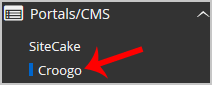
    4. On the left side of your screen, you should locate the Portal/CMS category. Click on it and then click on the Croogo link that will appear.
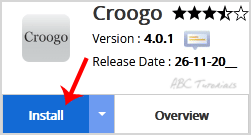
    5. Click on the Install button.
     

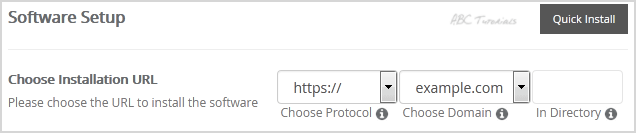
    6. Fill the necessary field, under the Software Setup field:

    • Choose Installation URL: Choose the appropriate protocol/domain. Inside the “In Directory” field, should you want to install this in a directory, i.e., example.com/directory, enter the directory name. Otherwise, leave it blank to install in your main domain, i.e., example.com
     

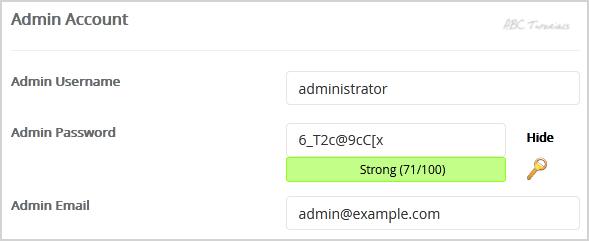
    7. Under the Admin Account field, enter the following information:

    • Admin Username: Your new Croogo username (for security reason do not use the Administrator or the Admin username.)
    • Admin Password: Use a strong password.
    • Admin Email: Your e-mail address.


    Note: Copy the admin username and password on a notepad because you will need these login details to access the admin area of your Croogo Website.


    8. Advanced Options: Leave this as it is unless you want to change the database name or take an automated backup. Please note that taking frequent backups may take a lot of disk space.

    Finally, scroll down to the end of the page and click on the Install button.

    Updated on January 7, 2018
    Was this article helpful?

    101 responses to “How to Install Croogo via Softaculous in cPanel?”

    1. Matilda Ozturk Avatar

      Is the default admin login from Softaculous safe to keep, or should it be changed straight away?

    2. Cosmin Waithera Avatar

      Saved me an hour of FTP headaches. Cheers for laying it out step by step.

    3. Linnea Abubakar Avatar

      What made you pick Softaculous over a manual Croogo setup? Genuinely curious.

    4. Rafferty Odhiambo Avatar

      Anyone know if Croogo still gets updates, or is this a trip down memory lane?

    5. Pelagia Nowicki Avatar

      Tried this on shared hosting last month; the whole thing took about five minutes. Worth it.

    6. Idris Vanterpool Avatar

      Short, clear, and no fluff. Exactly what a first-timer wants.

    7. Kalani Brouwer Avatar

      Why does Croogo need Softaculous at all? Is a manual upload really that painful?

    8. Teodor Vasilescu Avatar

      Nice and tidy walkthrough. Did the installer ask for a database name or create one itself?

    9. Zainab Haddadi Avatar

      Softaculous makes Croogo a one-click job? Curious whether the cPanel version matters much.

    10. Ingeborg Salvesen Avatar

      Such a calm, sensible walkthrough. Did you test it on older cPanel builds too?

    11. Marguerite Dufresne Avatar

      Croogo in minutes. My weekend plans just got a lot freer.

    12. Zdenek Hruska Avatar

      Honest question: who is this aimed at, beginners or seasoned admins?

    13. Fionnuala Gallagher Avatar

      Is there a quick way to undo it if the install goes sideways?

    14. Radoslav Petkanov Avatar

      Smooth read. The screenshots would make a nice bonus, though.

    15. Oluwaseun Adebayo Avatar

      Does it matter which PHP version the account runs? Just checking.

    16. Ximena Altamirano Avatar

      Wish I had this when I fumbled my first Croogo setup last spring.

    17. Takeshi Morimatsu Avatar

      A tidy install is half the battle. Thanks for laying it out.

    18. Danuta Wrobleska Avatar

      Why do so many guides skip the permissions bit? Glad this one did not.

    19. Gwilym Pritchard Avatar

      Clear, calm, and quick to follow. More like this, please.

    20. Leocadia Ferreyra Avatar

      So after install, what is the first thing you tweak? Asking for myself.

    21. Mehmet Karaosmanoglu Avatar

      Neat trick with the installer. I wish I had found it last month.

    22. Iolanthe Pescatore Avatar

      Anyone tried this on a tiny VPS? Wondering if memory gets tight.

    23. Katrine Sorvoll Avatar

      Plain steps, no fluff. Exactly how tutorials ought to read.

    24. Ayodele Bankole Avatar

      What made you pick Croogo over the usual suspects? Genuinely wondering.

    25. Bjorn Halvorsrud Avatar

      Saved me an evening of staring at config files. Worth every line.

    26. Tuyet Hoang Avatar

      Is the Croogo demo content installed by default, or do I start blank?

    27. Joaquim Vasconcelos Avatar

      Bookmarking this for the next client site. Cheers for the walkthrough.

    28. Soraya Mahmoudi Avatar

      Cpanel menus always feel like a maze. Did you ever get lost in there?

    29. Henrik Aasgaard Avatar

      Three steps and done? Suspiciously easy, and I love it.

    30. Wanjiru Kamau Avatar

      Nice and tidy. Does the same trick work for shared hosting plans?

    31. Pilar Echeverria Avatar

      Short guide, big relief. My cPanel finally feels less scary.

    32. Culann Breathnach Avatar

      Why Softaculous instead of a manual upload? Curious what tipped the scale.

    33. Anahita Zolghadr Avatar

      Honestly, one click and a coffee sounds like my kind of setup.

    34. Rasmus Tellefsen Avatar

      Did the installer ask for a database name, or did it sort that out by itself?

    35. Nikolai Oduya-Berg Avatar

      Neat little guide. Does the admin panel feel snappy afterward?

    36. Calista Dzhumaev Avatar

      Would this be the same process on a VPS instead of cPanel?

    37. Isidore Mbeki-Walsh Avatar

      Straight to the point and no fluff. Appreciated.

    38. Vesna Tillotson Avatar

      What made you pick Croogo for this tutorial anyway?

    39. Leopold Achebe-Frisk Avatar

      Nothing beats a guide that respects your time. Thanks for the tidy write-up.

    40. Judith Nakamura-Pryce Avatar

      Is there a quick way to roll back if the install goes sideways?

    41. Farrukh Abelsen Avatar

      Clear steps, no drama. My kind of afternoon reading.

    42. Ximena Throndsen Avatar

      Why Croogo rather than a hosted builder? I am nosy like that.

    43. Culley Rosenthal-Ba Avatar

      Took me back to my first cPanel login. Overwhelming, then oddly fun.

    44. Sunita Marchetti Avatar

      Quick question: does the default theme look dated out of the box?

    45. Bastien Okafor-Lindgren Avatar

      Wish every tutorial ended this cleanly. Zero fluff, all signal.

    46. Elowen Abernathy-Diaz Avatar

      Where would you point a total beginner after this?

    47. Matteo Kaczmarek-Sy Avatar

      Softaculous really is the unsung hero of cheap hosting.

    48. Dagny Ouedraogo Avatar

      Nice pacing. Is Croogo still actively maintained these days?

    49. Hiroko Valenzuela Avatar

      Installing a CMS used to eat my whole Saturday. Not anymore, apparently.

    50. Oskar Ibekwe-Lund Avatar

      Does this work on shared hosting with tight memory limits?

    51. Priyanka Delacroix-Voss Avatar

      A tidy guide, though I wonder why anyone skips the backup step.

    52. Lasse Mahlangu Avatar

      Step three tripped me up once. Anyone else lose ten minutes there?

    53. Ngozi Reidinger Avatar

      Bookmarking this for the next time a client wants a quick site.

    54. Tapiwa Brennagh Avatar

      Why Croogo over the other PHP CMS options? Genuinely wondering.

    55. Zeynep Havlicek Avatar

      Cpanel panels always feel like a cockpit. This makes the flight less scary.

    56. Andrzej Pelletier Avatar

      Short and sweet walkthrough. Did the installer ask for a database name?

    57. Rashida Tolliver Avatar

      Honestly, who still needs Croogo in 2026? Curious what you are building.

    58. Mireille Tabone Avatar

      Two clicks and a CMS appears. Magic, or just good packaging?

    59. Marjatta Soininen Avatar

      Croogo on Softaculous sounds painless. Was there a catch with the permissions?

    60. Aurelio Nakamura-Pryce Avatar

      Compliance forms are dull; installing a CMS in minutes is not. Thanks for the walkthrough.

    61. Branimir Castellanos-Yeo Avatar

      Quick one: does Croogo need any extra PHP modules the guide forgot to mention?

    62. Folasade Ketteringham Avatar

      Is it just me, or does every host hide the Softaculous icon somewhere different?

    63. Sakura Fennimore Avatar

      Seven minutes, a coffee, and a working site. Fair trade.

    64. Pellegrino Adjei Avatar

      Which PHP version did you pick, and did it matter at all?

    65. Kofi Valderrama Avatar

      Would love a follow-up on tweaking themes once Croogo is running.

    66. Ingrid Szymanowski-Adeyemi Avatar

      Nice and tidy. Does a backup before installing save headaches later?

    67. Radoslav Echeverria Avatar

      Tiny victory: my first one-click install. Now what do I do with it?

    68. Saskia Vromans Avatar

      Is there a reason this guide starts with cPanel rather than SSH?

    69. Emeka Lindgren-Voss Avatar

      What would break first if I skipped the permissions step?

    70. Valentina Ouedraogo Avatar

      Bookmark-worthy, if only for the screenshots. Any chance of a video version?

    71. Tadeusz Nwosu Avatar

      A glycerin-smooth install would be nice. Is this the one?

    72. Caoimhe Delacroix Avatar

      Epilepsy aside, my real question: does this guide cover the database step too?

    73. Zofia Abernathy-Mbeki Avatar

      Does Softaculous keep old versions around, or is it always the newest?

    74. Bashir Halloran Avatar

      Three clicks in and I already feel like a sysadmin.

    75. Mirela Castellanos Avatar

      Wish every tutorial opened with why you would need it. Why Croogo, exactly?

    76. Oluwaseun Pettersson Avatar

      Does the cPanel icon layout differ between hosts, or is mine just odd?

    77. Linnea Okafor-Doyle Avatar

      Plot twist: I came for WordPress and left curious about Croogo.

    78. Yusuf Brannigan Avatar

      Is the Croogo CMS still worth setting up these days, or is this just nostalgia?

    79. Dmitri Alvarenga Avatar

      Anyone else keep a sticky note of cPanel steps? Asking for a forgetful friend.

    80. Henrietta Kowalczyk-Boateng Avatar

      Short and sweet is how I like my installs. Was this one actually painless?

    81. Beatrix Ngugi Avatar

      Honest question: why go through Softaculous instead of a manual Croogo setup?

    82. Ilkka Maldonado-Reyes Avatar

      Healthcare strain aside, did the Croogo install actually finish for you in one go?

    83. Nandini Varghese Avatar

      Softaculous always feels like magic until it breaks. Did Croogo behave for you?

    84. Rasmus Teodorescu Avatar

      Which step tripped you up most in cPanel before you went hunting for a guide?

    85. Eulalia Breckenridge Avatar

      Honestly curious: what are you hosting on Croogo these days?

    86. Leandro Pavlovic Avatar

      What is the catch with Softaculous installs? Feels too painless.

    87. Ngozi Brightwell Avatar

      Installing a CMS before breakfast is my new favorite flex.

    88. Bertrand Oyelaran Avatar

      Did anyone else expect more drama from a CMS install? Pleasantly dull.

    89. Xiomara Quispe Avatar

      Quick, practical, zero fluff. Exactly how a guide should behave.

    90. Lars-Erik Hovland Avatar

      Smooth read. The screenshots would have been my only wish.

    91. Perpetua Okello Avatar

      Question for the room: who still hand-installs CMS software in this decade?

    92. Idris Karimov Avatar

      Tutorials like this are why my weekend projects actually finish.

    93. Calista Moreau-Diaz Avatar

      Croogo, huh? Been ages since I heard that name. Nice throwback.

    94. Ansgar Peltonen Avatar

      Is there a reason this needs cPanel rather than a plain manual upload?

    95. Tavita Leilua Avatar

      Nobody warns you how satisfying a clean install feels. Well, now somebody has.

    96. Soren Ballesteros Avatar

      Does the Softaculous version of Croogo lag behind the latest release?

    97. Mireille Okafor Avatar

      A tidy walkthrough beats a messy forum thread every single time.

    98. Yusuf Demirtas Avatar

      Follow the steps and the installer does the heavy lifting. Neat.

    99. Beatrix Lindqvist-Roy Avatar

      Why bother with Croogo today? Genuinely asking, the CakePHP angle intrigues me.

    100. Kamal Seneviratne Avatar

      Three clicks, one login, a fresh CMS. I love when setup behaves.

    101. Ottoline Fairweather Avatar

      Croogo through Softaculous: what made you pick it over WordPress for this project?

    Leave a Reply

    Your email address will not be published. Required fields are marked *