Remote Desktop Authentication Error Has Occurred. The function requested is not supported

Contents

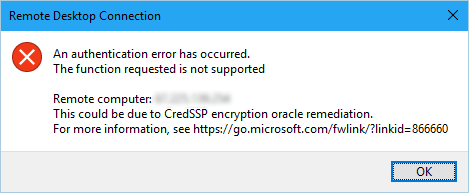
    Error:

    An authentication error has occurred.
    The function requested is not supported

    Remote computer: <computer name=””>
    This could be due to CredSSP encryption oracle remediation.
    For more information, see https:/go.microsoft.com/fwlink/?linkid=866660


    Since the Microsoft Security Patch on Tuesday, we’ve received many reports of users having connection problems like this: 
     

    The error impacts:

    • Remote Desktop Connection
    • Remote Desktop Connecting to Azure VMs
    • VPN Network Connections (before one can even try to use Remote Desktop)

    Fix: 

    1. On your Local Computer
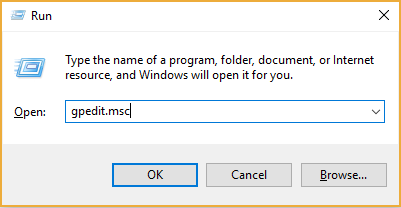
    2. Open up RUN
    3. Type in:
      gpedit.msc

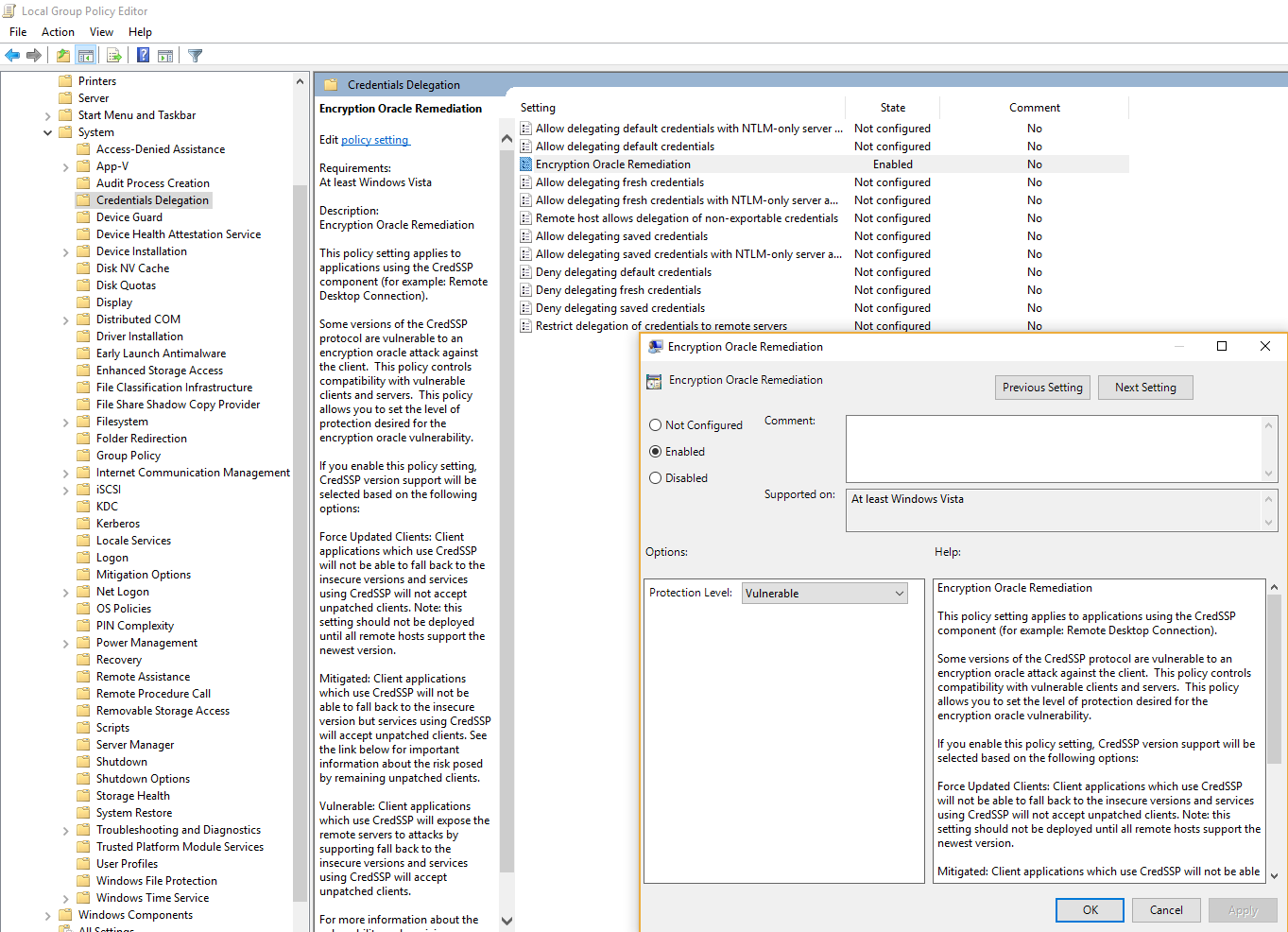
    4. Navigate to the following Computer Configuration.Computer Configuration / Administrative Templates / System / Credentials Delegation
    5. Double click on Encryption Oracle Remediation– 1 Enable Encryption Oracle Remediation
      – 2 Change Protection level to: Vulnerable
     

    Any issues – please post in the comments below.

    Updated on June 6, 2018
    Was this article helpful?

    24 responses to “Remote Desktop Authentication Error Has Occurred. The function requested is not supported”

    1. A useful reminder that small wording clues can point to a larger configuration problem. What diagnostic step would you try next?

    2. Fadhil Alkhouri Avatar

      The steps here make a complicated authentication issue much easier to follow. Which part would you test first in a production environment?

    3. A focused troubleshooting checklist is useful when the error text is vague. Which part of the process helped you narrow down the cause?

    4. The troubleshooting notes are useful and easy to follow. Which step should be revisited if the connection still fails after the initial fix?

    5. Joe Miller Avatar

      This article makes the failure mode much less mysterious. What is your preferred first test when a session suddenly refuses authentication?

    6. A thoughtful overview of a frustrating issue. Did the recommended fix behave consistently on both older and newer clients?

    7. Joe Miller Avatar

      The checklist gives a helpful path through a tricky error. Has anyone found a reliable way to confirm the change without restarting the whole workstation?

    8. The guide turns a confusing authentication error into a manageable checklist. Which step should be repeated if the first attempt does not work?

    9. Joe Miller Avatar

      The explanation is clear and refreshingly practical. Which symptom tells you that the authentication setting is the real culprit?

    10. Joe Miller Avatar

      The troubleshooting flow is nicely structured. Has anyone compared these steps with a fresh client setup to isolate the cause?

    11. Joe Miller Avatar

      I appreciate the practical focus of this guide. Which verification step gives you the most confidence that the authentication problem is resolved?

    12. Joe Miller Avatar

      This is a useful reminder that small policy details can block a connection. What would you check first when the same message appears again?

    13. Joe Miller Avatar

      The sequence of checks is especially helpful here. Has anyone found a quick way to spot this configuration issue before it causes a failed session?

    14. Joe Miller Avatar

      A concise troubleshooting guide like this is easy to revisit. Which step would you recommend checking before making any broader changes?

    15. Joe Miller Avatar

      This walkthrough highlights an easy-to-miss configuration detail. What is the safest way to verify the fix before reconnecting?

    16. Brenda Avatar

      A clear example of the issue and its fix. Has anyone noticed whether this problem returns after a system update?

    17. The article explains the underlying problem in a straightforward way. What quick check confirms that the client is ready to reconnect?

    18. Jefferey Galgano Avatar

      A practical walkthrough like this can save a lot of troubleshooting time. Which diagnostic check should be tried first when the error appears?

    19. The error message points to a subtle compatibility issue. Has anyone tested this fix across multiple Remote Desktop clients?

    20. This article offers a useful starting point. Has anyone confirmed which authentication setting matters most in practice?

    21. This guide makes the cause much easier to understand. Did a reboot alone help, or was an additional policy change needed?

    22. The authentication failure can be confusing at first. Which step made the biggest difference for you when testing the connection?

    23. I followed the troubleshooting steps and found the explanation clear. Has anyone tried the same fix on a recently updated client?

    24. panadia Avatar

      Has anyone else found a reliable way to resolve this Remote Desktop authentication error? The troubleshooting steps here are a helpful starting point.

    Leave a Reply

    Your email address will not be published. Required fields are marked *