
Exchange SP3 – Failed (Reboot Required)

Contents

    Exchange-2010-sp3-reboot-previous-installation-pending

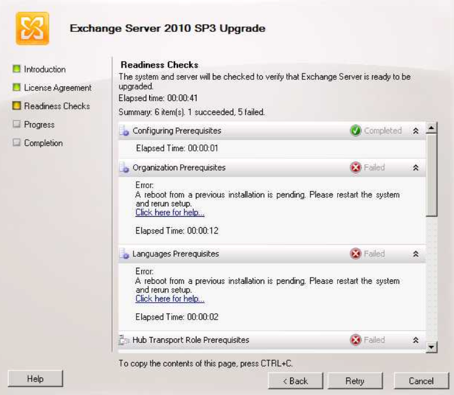
    Issue: Error “A reboot from a previous installation is pending” during readiness checks when installing Exchange 2010, Exchange 2013, Exchange Service Packs or Cumulative Updates.

    Cause: Certain indicators are getting flagged as a pending installation, this could be caused by data in the PendingFileRenameOperations registry key or in some cases printers being pushed out to the server through GPO.

    Solution (applicable to Exchange 2010 and Exchange 2013):

    A) Reboot the server and attempt the installation again

    B) If you receive the error message again “A reboot from a previous installation is pending,” take the following course of action:

    1) Remove any printers from the Exchange server, reboot and try the installation again.

    2) Open Registry editor and browse to the following registry key:
    HKLM\SYSTEM\CurrentControlSet\Control\SessionManager\PendingFileRenameOperations

    3) View the contents of this key and save the contents to notepad.

    4) clear out the PendingFileRenameOperations key so it is empty.

    Note: In some cases the key will be blank already, and you may need to check the contents of the backup key:
    HKLM\System\ControlSet001\Control\SessionManager

    5) Attempt the Exchange installation again
    Note: It’s recommended to have a full system backup before editing the registry and also export the registry key that you are editing so you have a backup copy of its contents.

    Updated on April 11, 2016
    Was this article helpful?

    48 responses to “Exchange SP3 – Failed (Reboot Required)”

    1. Wilson J Avatar

      Thank-you! saved my life!

    2. Roomrew Avatar

      AMAZING!

    3. Michaelhiz Avatar

      I appreciate you writing this article and also the rest of the website is also really good.

    4.  Avatar

      This website was… how do you say it? Relevant!! Finally I have found something which helped me. Thanks!

    5. Hi there! This article couldnít be written much better! Looking at this article reminds me of my previous roommate! He continually kept preaching about this. I am going to send this article to him. Fairly certain he will have a good read. Thanks for sharing!

    6. There’s certainly a great deal to know about this
      issue. I like all the points you’ve made.

    7. Melinda Avatar

      I love it when people get together and share views. Great site, continue the good work!

    8. Hi it’s me, I am also visiting this web page regularly, this web
      site is genuinely good and the viewers are really sharing good thoughts.

    9. PERFECT!

    10. Michaeltuh Avatar

      This finally makes the next step feel easy.

    11. Scottpreaw Avatar

      A tidy result after a messy start.

    12. Robertguife Avatar

      Was this really worth a guide?

    13. Clean fix, no fuss.

    14. JamesAsype Avatar

      Nailed it.

    15. MartinFek Avatar

      Surely the settings should explain this by now?

    16. RobertoEquip Avatar

      Helpful walkthrough; I’ll bookmark the idea.

    17. Eugeneled Avatar

      I finally found the missing step—cheers.

    18. IrvingCaw Avatar

      Isn’t this mostly restart, then retry?

    19. Michaelgok Avatar

      Neat!

    20. ArthurSaugh Avatar

      Do we really need a guide for this?

    21. ArturoMer Avatar

      That clears it up nicely.

    22. Dustingroug Avatar

      That makes sense.

    23. Noted, thank you.

    24. NathanCette Avatar

      Short and sweet—thanks.

    25. JasonPeell Avatar

      Nice and clear.

    26. RogerFrigh Avatar

      Exactly what I needed.

    27. LeslieCAL Avatar

      Much appreciated.

    28. JamesAsype Avatar

      Could use this.

    29. MartinFek Avatar

      Well explained.

    30. Robertflall Avatar

      This was useful, thanks.

    31. Yep, that makes sense.

    32. Jordan P. Avatar

      No complaints here.

    33. Michaeltuh Avatar

      A solid write-up.

    34. Vernonweank Avatar

      That did the trick.

    35. Michael S. Avatar

      I had to wait longer than expected after the reboot because the Exchange services did not all start at once. Once the information store and transport services were both running, the console connected and mail flow testing was normal. Watching the service status before retrying the failed step saved me another restart.

    36. After the reboot, I checked the Exchange services first instead of immediately retrying the installation. The event log showed the failed step had completed, and a test message moved through the server normally afterward. That sequence made it clear when the system was ready for normal use.

    37. The guide matched what I saw when the Exchange service failed during the update. I cleared the stuck reboot condition, restarted the server, and then verified that the admin console could connect again. Checking the service status before opening the first mailbox gave me a reliable final check.

    38. I kept the server offline until the failed Exchange update had finished writing to the event log. After the required reboot, checking the setup and service logs showed that the components had registered normally. That extra pause helped me avoid testing mail flow while the repair was still in progress.

    39. The reboot step was the part that finally cleared the Exchange setup failure for me. I also checked that the information store and transport services were running before testing a mailbox. Waiting for both services to settle made the follow-up checks much less confusing.

    40. I followed the reboot procedure and the Exchange service came back cleanly afterward. Checking the event log for the failed setup step helped me confirm that the restart had completed the repair. The note about waiting for the services before testing mail flow was especially useful.

    41. I ran into the same Exchange SP3 install loop where setup reported a failure and kept asking for a reboot. After checking pending reboots and stopping related Exchange services cleanly before retrying, the update completed without the false failure. Worth confirming nothing else is holding a reboot lock before you run the install again.

    42. JoshuaToste Avatar

      Appreciate the clear explanation.

    43. Brilliant!

    44. Michaelgok Avatar

      Как выбрать прямой диван в Екатеринбурге

    45. Материалы

      Надежная конструкция

    46. Как устроен процесс бухгалтерского сопровождения

    47. Кому необходимо бухгалтерское сопровождение

      Как формируется цена на бухгалтерское сопровождение
      Что включает в себя бухгалтерское сопровождение

    48. По цене массовая косметика значительно отличается: от низкой цены масс-маркета и части аптечной, до высокой – в селективе и отдельных группах аптечной косметики (зарубежные бренды).
      Профессиональные продукты
      много средств вкладывается в рекламу, упаковку и создание имиджа бренда
      Профессиональная косметика – это высокоэффективные препараты, предназначенные для использования исключительно в условиях косметического салона для проведения интенсивного курса коррекции различных косметических недостатков https://cosmi-proff.ru/product/moonsoon-mist-tone-peel-400-ml-uvlazhnyayuschiy-i-osvezhayuschiy-mist-dlya-litsa

      Оно заложено в самом определении:

      разработаны специалистами в области дерматологии и рекомендуются косметологами, имеющими практический опыт

    Leave a Reply

    Your email address will not be published. Required fields are marked *